Minecraft Server Management System

Proje Görselleri (1)
En Son Versiyon
Proje Açıklaması

CaYaDev Server Manager (MSMS)
Portable, open-source desktop control panel for Minecraft servers — bilingual (English / Türkçe), built with Electron + React + TypeScript. A CaYaDev project.



Overview • Features • Server Software • Getting Started • Screenshots • Web Panel • Map Page • Development • Roadmap
🌍 Language
This README is written primarily in English so the project is accessible to the wider Minecraft and open-source community.
The application itself supports:
- English
- Türkçe
- Automatic system-language detection
- English fallback when the operating-system language is unsupported
A Turkish project summary is available near the end of this README: Türkçe Özet.
📌 Project Status
MSMS is under active development, and the whole of it now runs: the desktop manager, the admin web panel, the public website with its store and economy, and a third page that is nothing but a fullscreen live map. The web layer and the store are no longer beta — they are covered by the same automated gates as the rest of the app.
What is still young rather than unfinished:
- MSMS Bridge — the plugin builds and self-tests, and the app reads it, but it has had far less time in live servers than the desktop core.
- Modded worlds — block colours and item icons come from the vanilla client jar, so a heavily modded world renders its vanilla blocks correctly and falls back to a generated colour for the rest.
Before using MSMS for an important public server, test the workflows you plan to rely on and keep independent backups of your server data.
🚀 Overview
CaYaDev Server Manager, also referred to as MSMS (Minecraft Server Management System), is a Windows-first desktop application for managing Minecraft servers without requiring a separate web stack, database server or traditional control-panel installation.
It is designed around a portable workflow:
- Place the application in the directory you want to use as your MSMS root.
- Add an existing Minecraft server or create a new one.
- Manage the server from a graphical interface.
- Keep application data in
msms-data/beside the executable. - Move or back up the complete root folder when needed.
MSMS aims to cover both everyday administration and more advanced server-management tasks from a single application:
- server creation and discovery
- process control
- live console and RCON
- JVM configuration
- player moderation
- worlds
- plugins and mods
- file management
- backups
- scheduled automation
- performance monitoring
- crash analysis
- alerts
- audit/history views
- remote web-panel access
- experimental store/economy tooling
📸 Screenshots
Every picture below is taken by the app of itself against throwaway demo
servers — MSMS_SHOTS=<dir> renders each view offscreen and writes a PNG, so
they can be retaken after a redesign instead of quietly going stale.
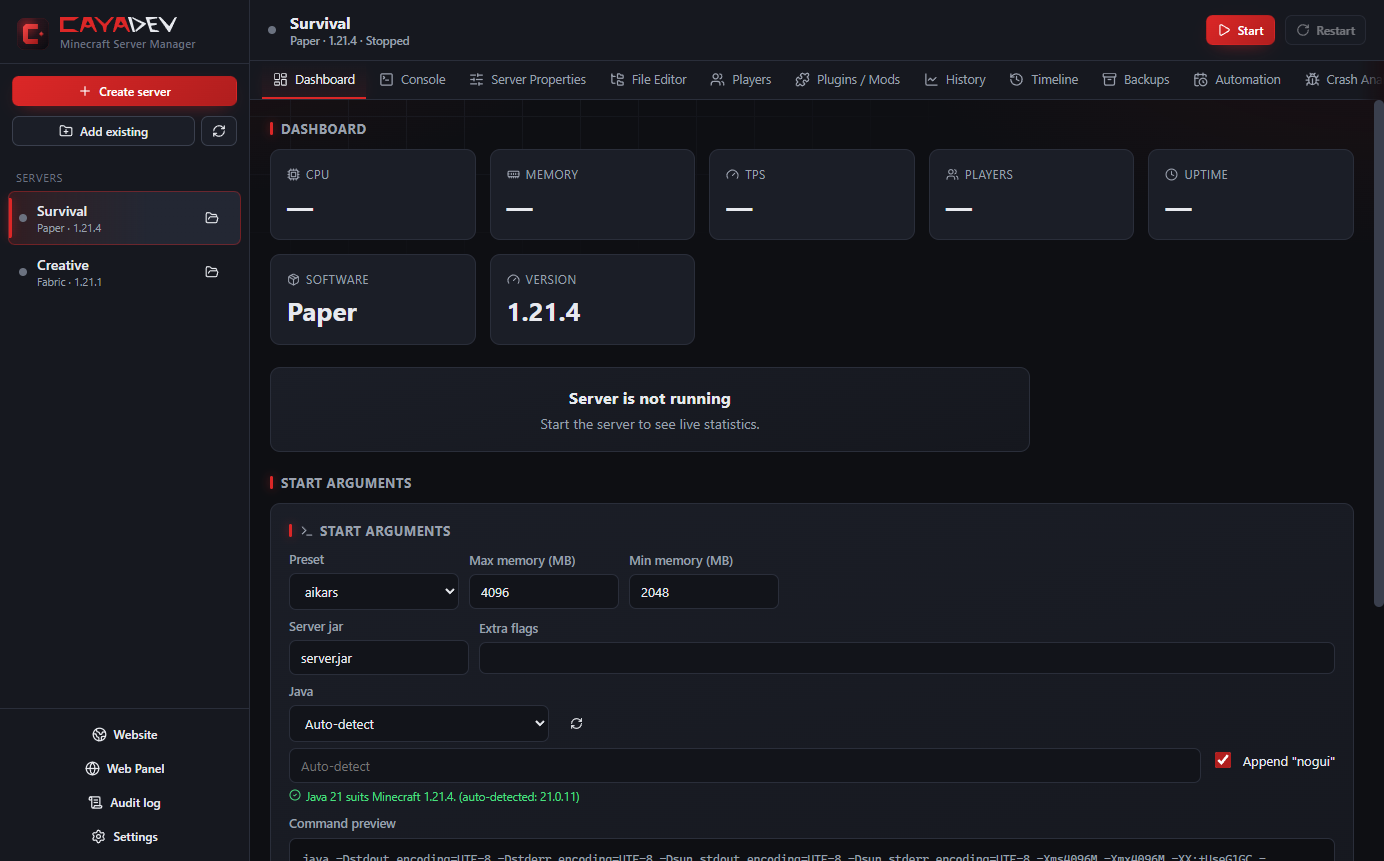
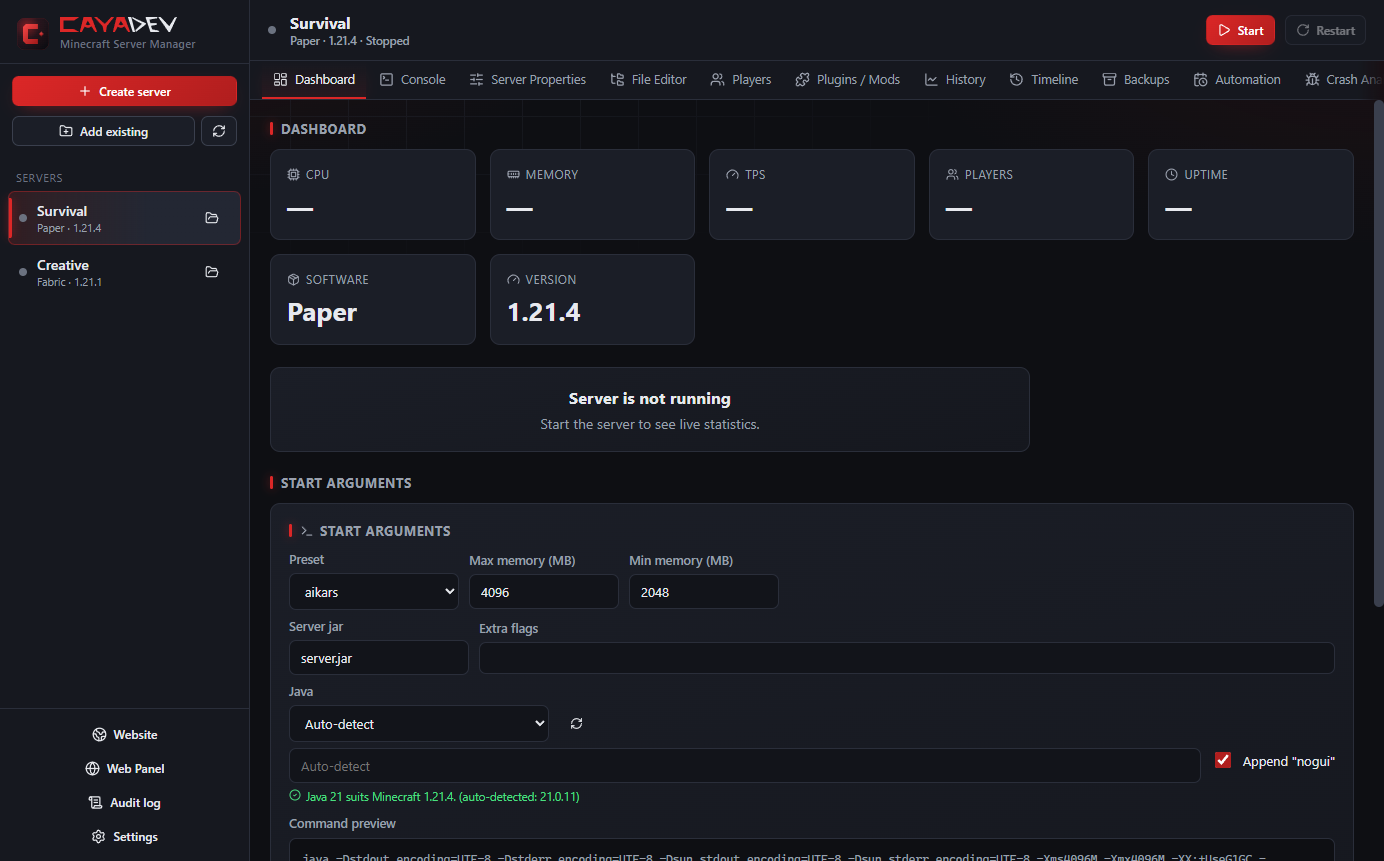
Dashboard
Live CPU, memory, TPS, players and uptime, with the launch arguments and the exact command MSMS will run underneath them.
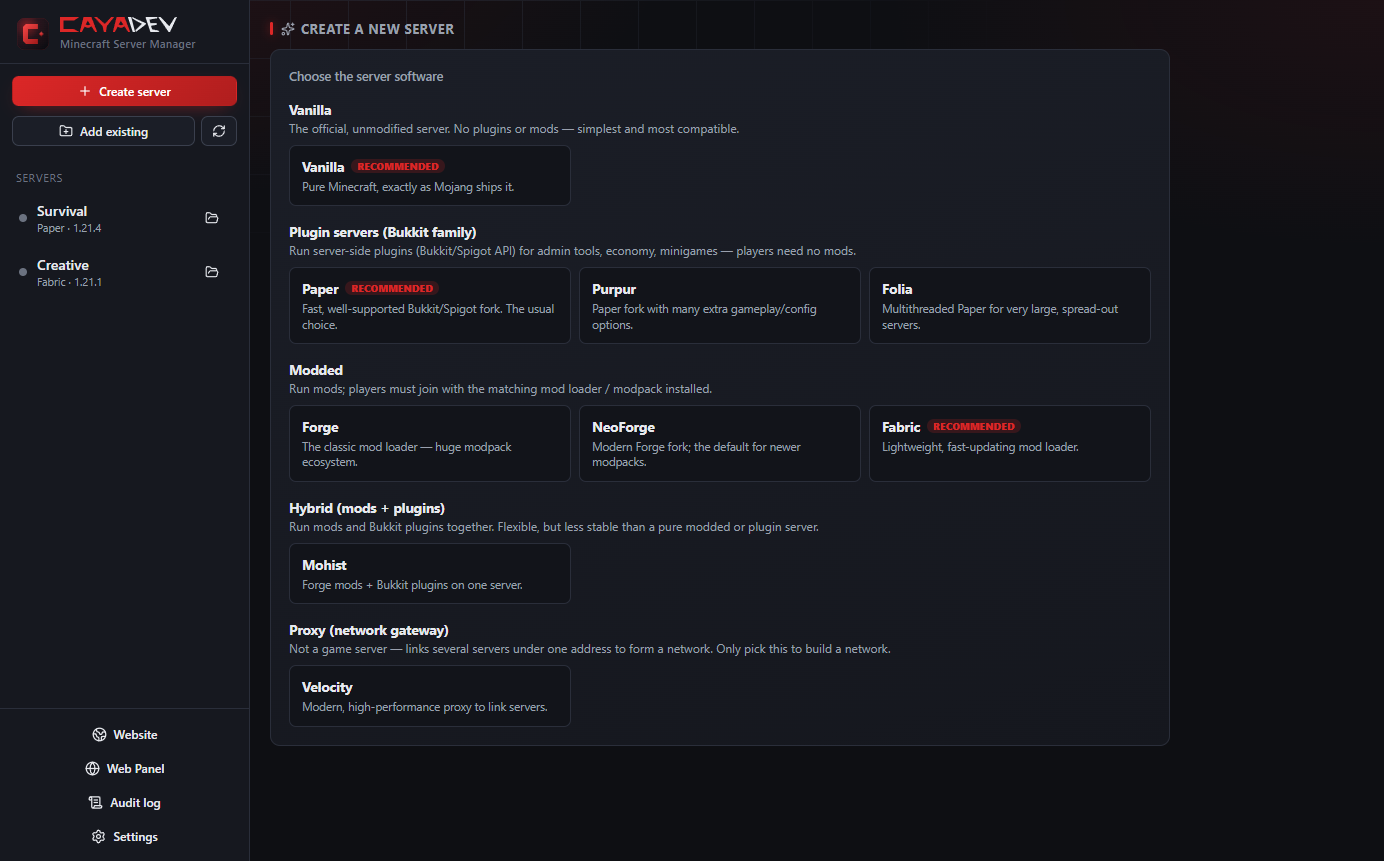
Creating a server
Server software grouped by what it is for — vanilla, plugin servers, modded, hybrid, proxy — rather than an alphabetical list of names a newcomer cannot rank.
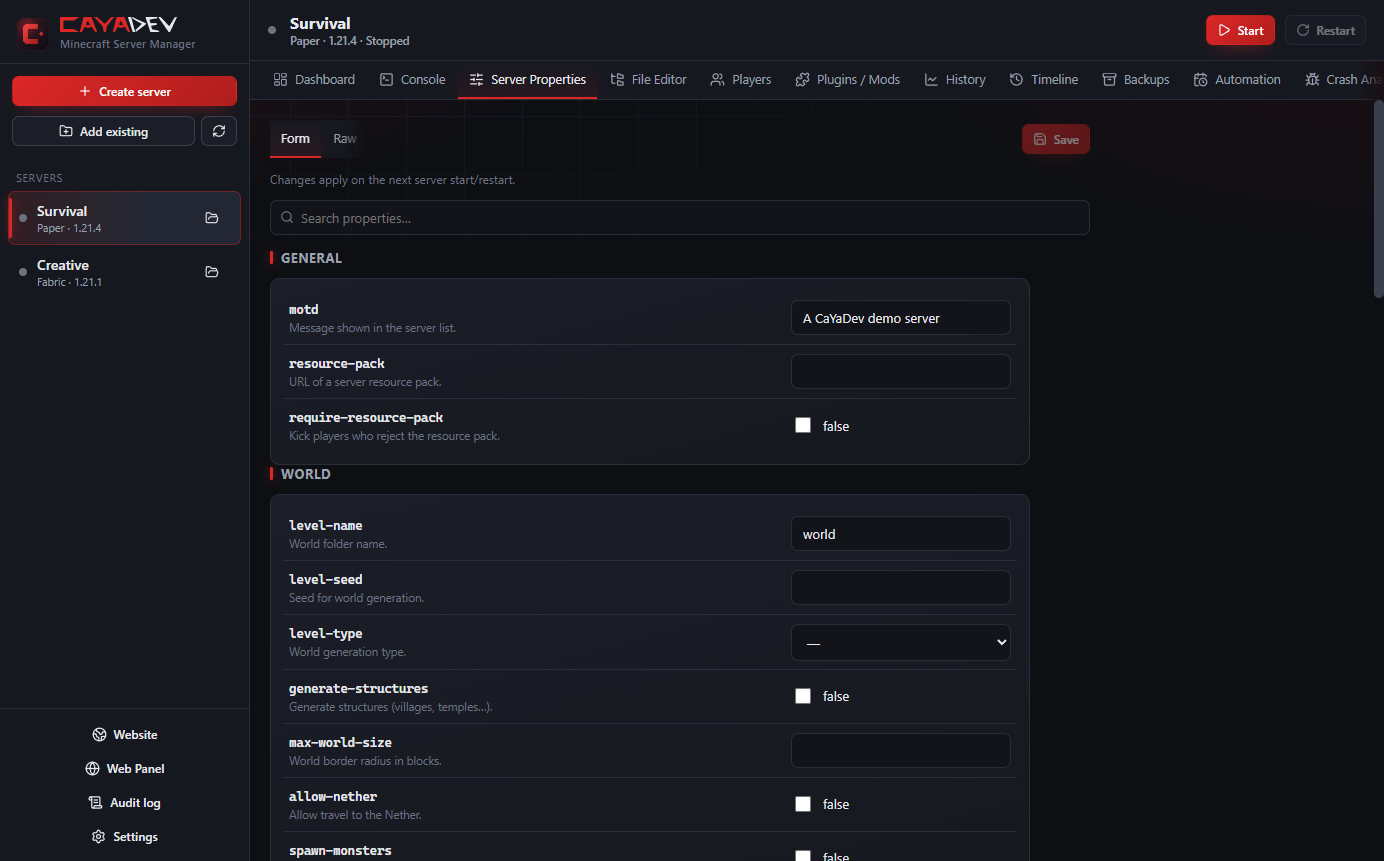
server.properties
Every setting with an explanation, grouped and searchable, plus raw editing for anything MSMS does not know about.
Players and the live map
Moderation, world controls, the NBT inventory viewer, and a live map rendered from the server's own region files.
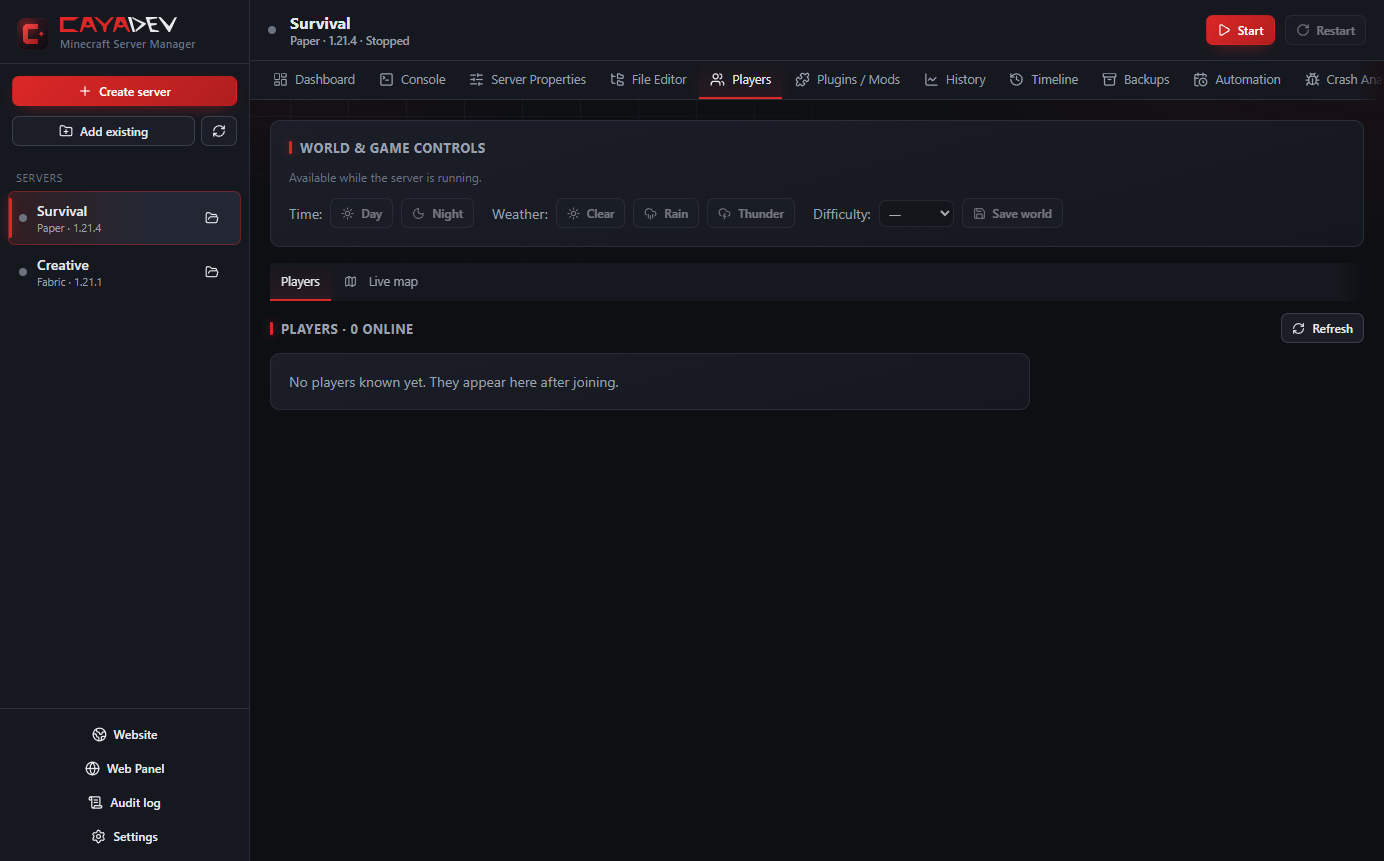
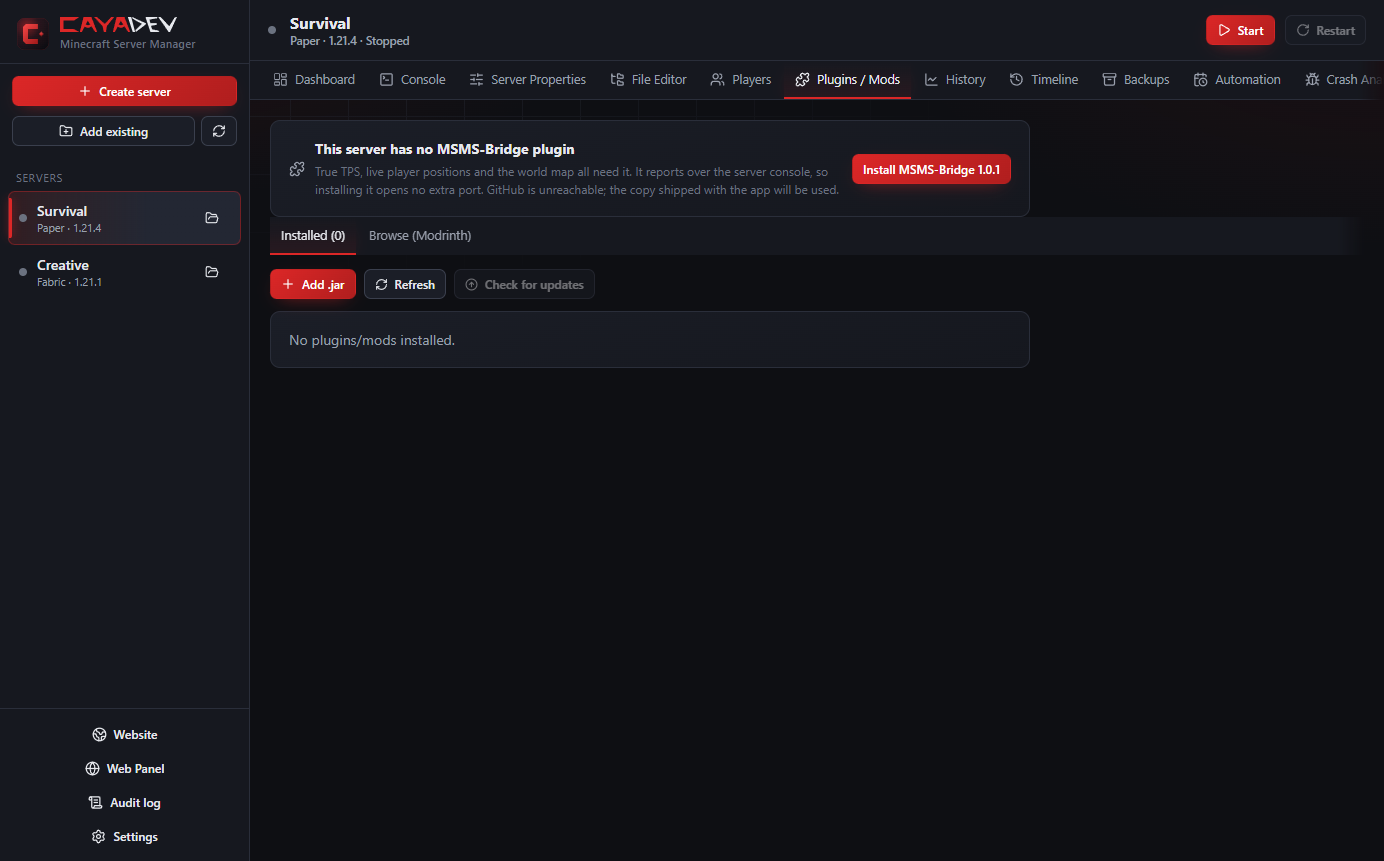
Plugins and mods
Installed jars with enable/disable, plus Modrinth search and one-click install.
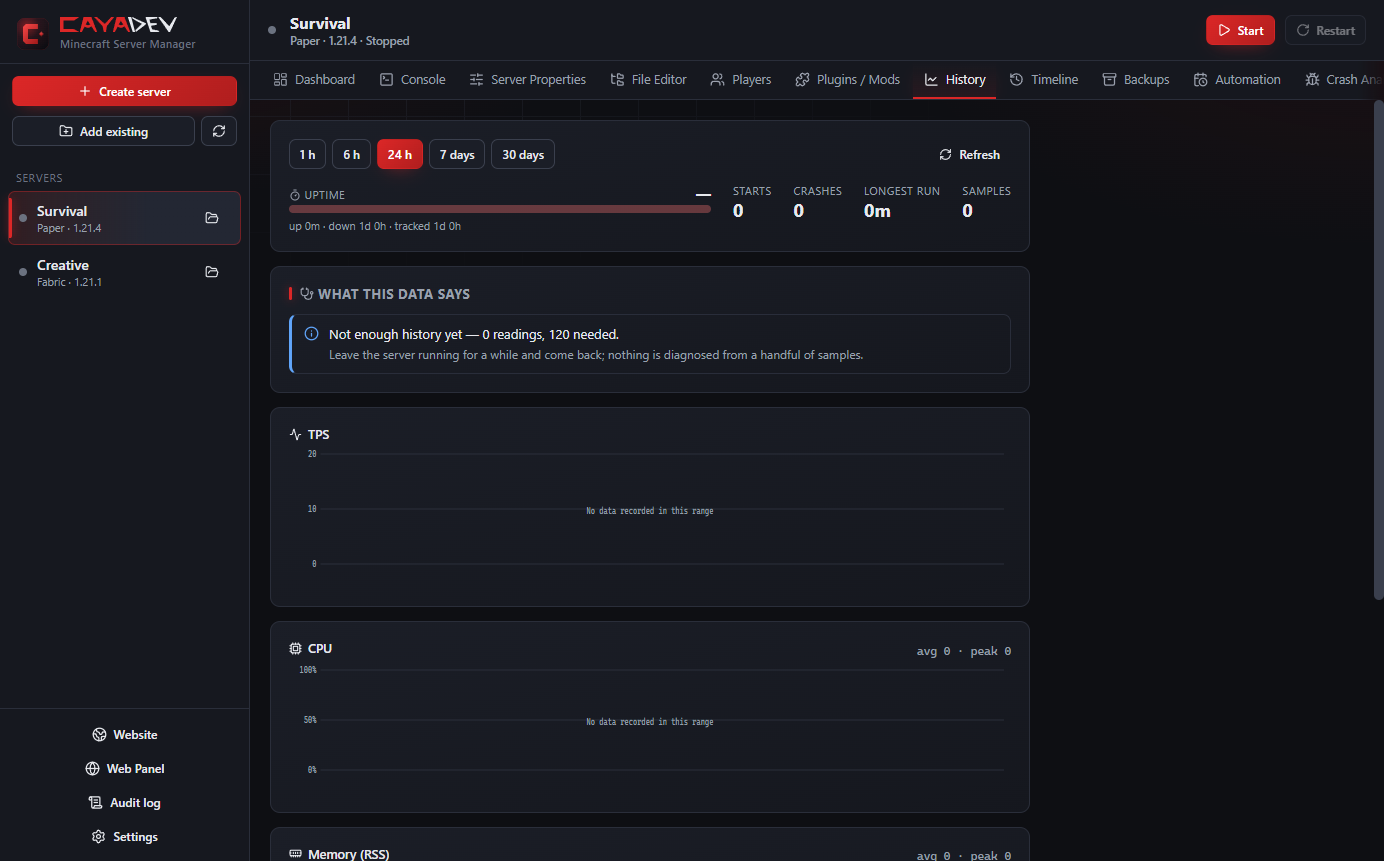
History
CPU, memory, TPS and player count over time, with an analysis pass that says what the data means rather than leaving you to read four charts.
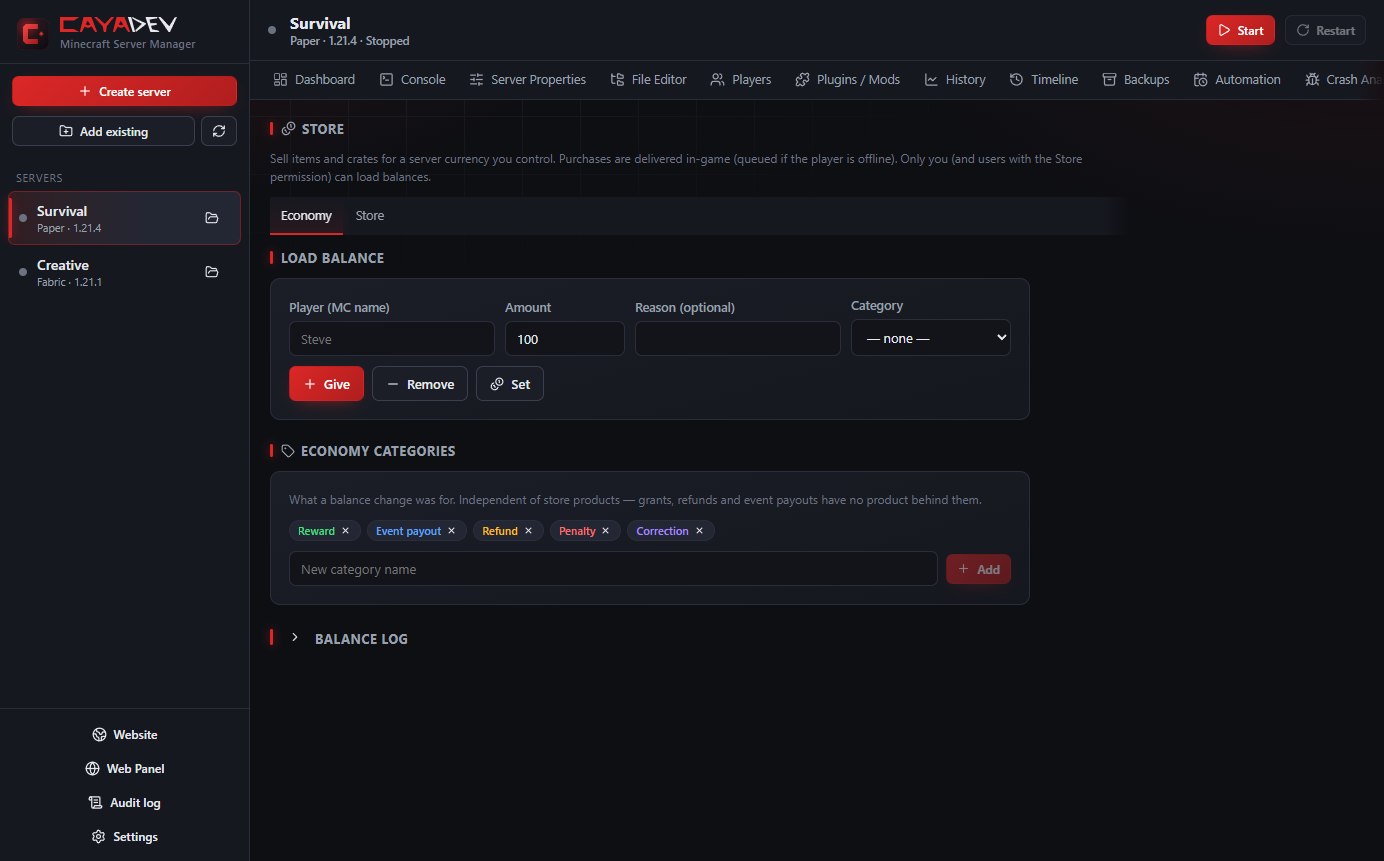
Store and economy
A server currency, balances, products, crates with published odds, and in-game delivery that queues while a player is offline.
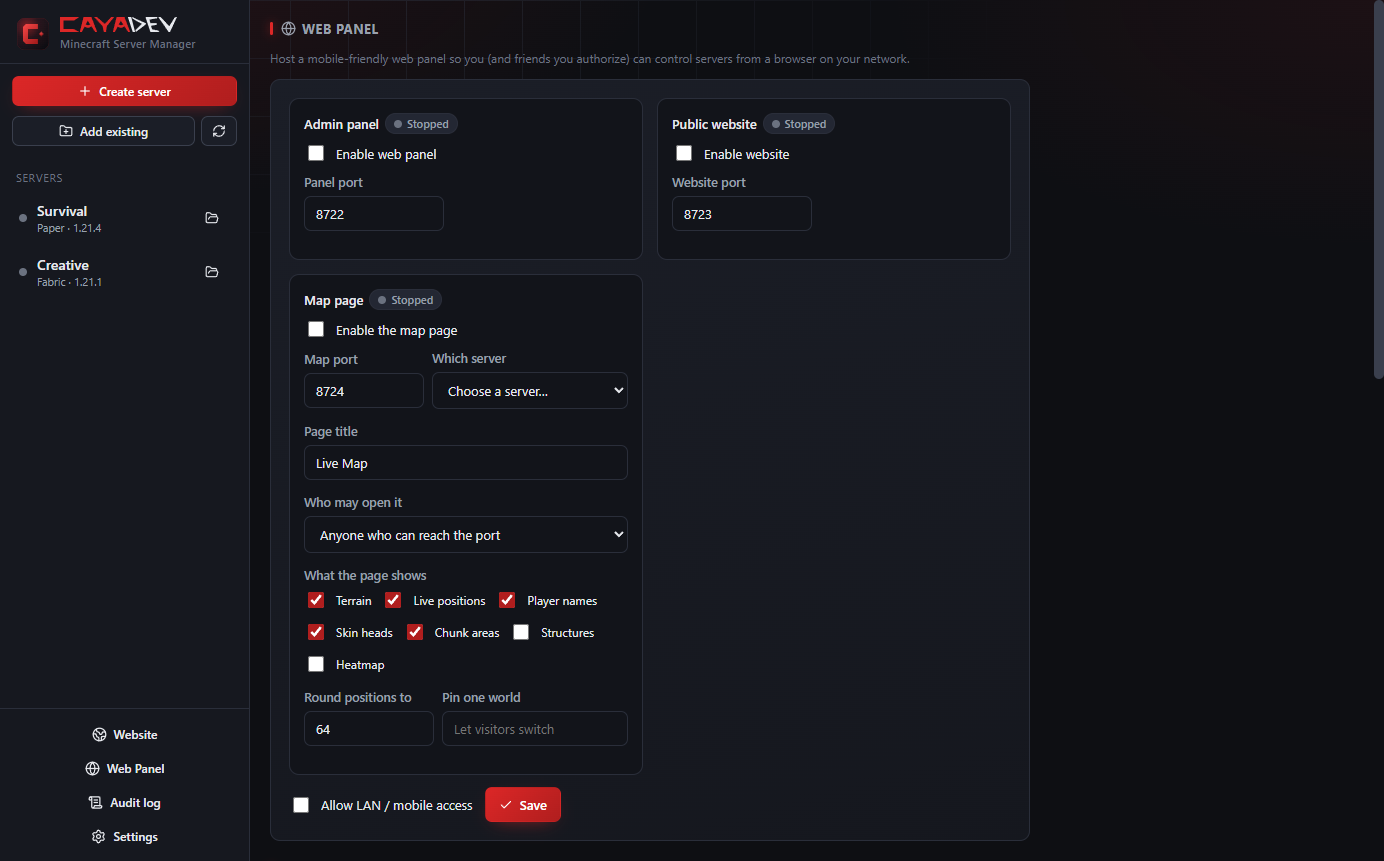
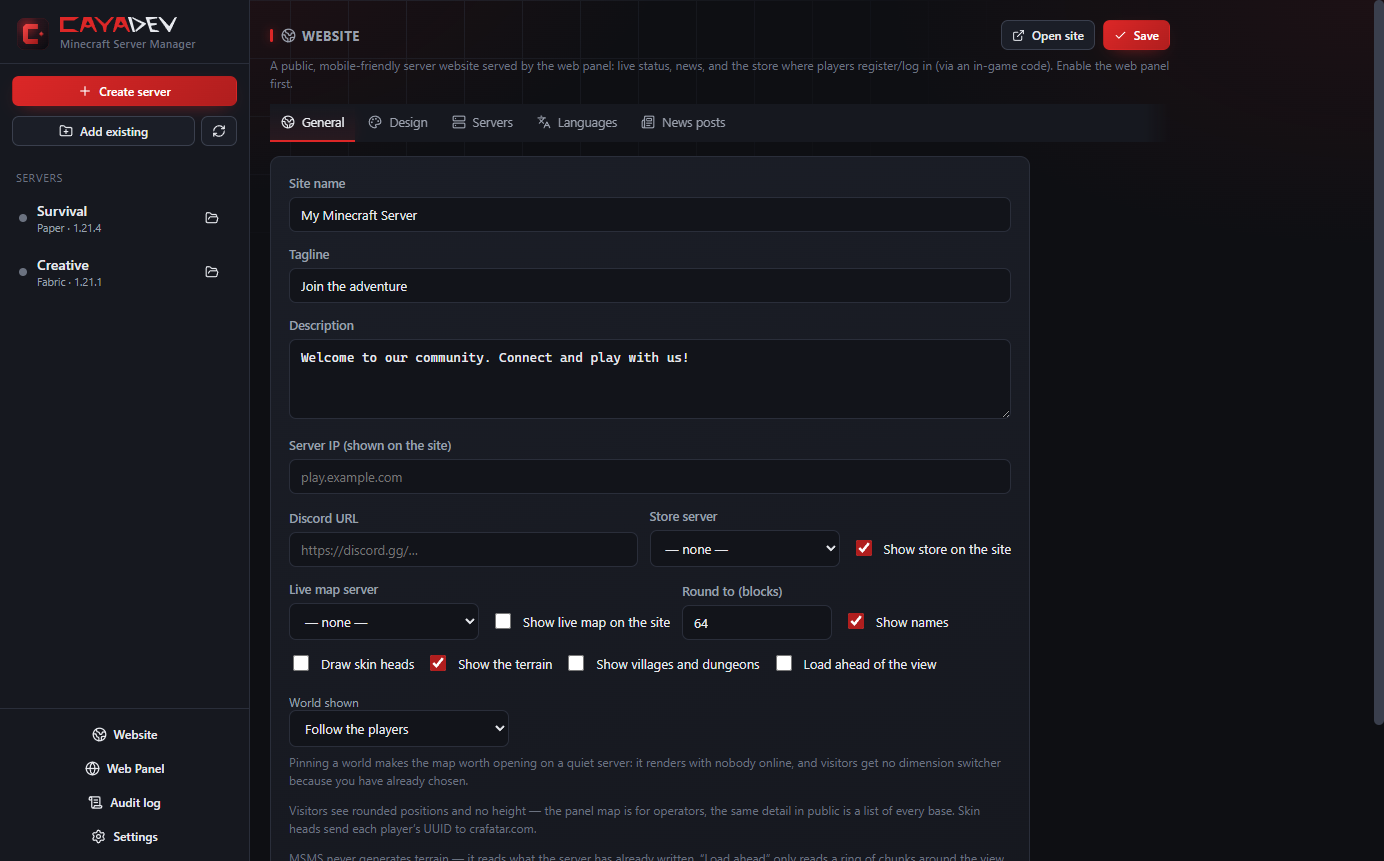
Web panel and public website
Two more surfaces, each with its own listener, port and access rules.
✨ Why MSMS?
Portable by design
MSMS uses its launch directory as its working root instead of hiding the project state across unrelated operating-system directories.
That makes it easier to:
- keep the panel beside your Minecraft servers
- move the complete setup to another drive
- back up panel data and server folders together
- maintain multiple isolated MSMS environments
- use removable or secondary storage when appropriate
Desktop-first administration
MSMS is not built around the assumption that every user wants to deploy a Linux web panel, reverse proxy, SQL database and separate daemon.
For a local machine, Windows server, home lab or development environment, the desktop application can manage the server directly.
Existing servers are welcome
You do not have to recreate a working server just to start using MSMS.
Existing server directories can be registered and inspected, with server type/version detection used to reduce manual configuration.
Beginner-friendly without hiding advanced controls
A server can be started and stopped with the GUI, while advanced users can still work with:
- custom JVM arguments
- Aikar-style launch presets
- RCON
- raw configuration files
- scheduled commands
- server files
- backups
- Java runtime selection
- audit/history information
🧩 Features
🖥️ Server Management
MSMS provides a central interface for registered Minecraft servers.
Core process-management capabilities include:
- start
- stop
- restart
- force kill when necessary
- live process state
- uptime tracking
- server registration
- server discovery
- server type/version detection
- management of multiple registered servers
- protection against leaving unmanaged Java processes behind when the application exits
Graceful shutdown workflows can:
- notify connected players
- perform a countdown
- save the world
- disconnect players cleanly
- stop the server after the shutdown sequence
🖥️ Live Console & RCON
The console is intended to replace the need to constantly switch to a raw terminal window.
Features include:
- real-time log output
- command input
- command history
- server command execution
- RCON-backed management features
- live server information where available
- world/server control operations through the management layer
RCON can be used by MSMS for features that require structured command access.
RCON credentials should always be treated as sensitive information. Do not expose an RCON port directly to untrusted networks.
🏗️ Server Creation Wizard
MSMS includes a server-creation workflow that can retrieve available versions and prepare supported server software.
Currently represented in the project:
| Server software | Workflow | Notes |
|---|---|---|
| Vanilla | ✅ One-click capable | Official server |
| Paper | ✅ One-click capable | Performance-oriented Bukkit-compatible server |
| Folia | ✅ One-click capable | Regionized multithreading architecture |
| Purpur | ✅ One-click capable | Paper-derived server |
| Fabric | ✅ Supported | Modded server platform |
| Forge | ✅ Supported | Uses the official installer workflow |
| NeoForge | ✅ Supported | Uses the official installer workflow |
| Mohist | ✅ Supported | Hybrid/modded workflow |
| Velocity | ✅ Supported | Proxy software |
| Spigot | ⚠️ Not one-click | BuildTools compilation is intentionally required |
The creation pipeline is designed to support:
- live version retrieval
- server software selection
- downloadable server artifacts
- hash/checksum verification where supported
- official installer execution for Forge/NeoForge
- creation progress reporting
- Java/runtime checks
Availability can depend on the upstream project, its API and its version metadata.
☕ Java Runtime Management
Minecraft server versions do not all use the same Java version, so MSMS includes Java-related management rather than assuming one hard-coded runtime.
The project includes modules for:
- Java discovery
- Java scanning
- runtime validation
- Java executable selection
- JVM argument handling
- optional Java provisioning
- portable runtime storage
When provisioning is used, MSMS can prepare an Eclipse Temurin runtime and validate the downloaded/runtime files before use.
Java requirements ultimately depend on the Minecraft version and server software you choose.
⚙️ JVM Arguments & Launch Profiles
MSMS supports both easy presets and manual control.
Available concepts include:
- configurable minimum heap
- configurable maximum heap
- optimized JVM presets
- Aikar-style flag presets
- large-heap tuning
- fully custom JVM arguments
- launch command preview
- per-server configuration
This lets users start with a recommended profile and later tune the command manually.
Example concept:
java [JVM options] -jar server.jar nogui
MSMS generates/manages the final command based on the selected server configuration.
📝 server.properties Management
The application includes a dedicated properties editor for common Minecraft server settings.
The project supports both:
- structured/typed GUI editing
- raw file editing
This allows common options to be changed without manually searching through the complete properties file, while still preserving access to the underlying configuration.
📁 File Manager & Code Editor
MSMS contains a built-in server file browser/editor.
The editor stack includes CodeMirror language support for:
- JSON
- YAML
- XML
- HTML
- CSS
- JavaScript
The interface is designed around features such as:
- file navigation
- text editing
- syntax highlighting
- multiple editor tabs
- split-view editing
- configuration-file workflows
This is useful for server configuration files, plugin/mod configuration and other text-based server resources.
Always keep backups before manually editing important configuration or world-related files.
👥 Player Management
Player administration is available from a dedicated management view.
Supported management concepts include:
- online-player visibility
- OP / de-OP
- whitelist management
- ban / unban
- kick
- gamemode changes
- player-related command execution
- playtime information
- position information
- health information
- IP information where available
- UUID/player identity information
Some information depends on server state, available files, RCON access or Minecraft data formats.
🎒 Player Inventory Viewer
MSMS includes player-data/NBT functionality for inspecting player inventory information.
The inventory tooling can work with:
- Minecraft NBT player data
- inventory slots
- item identifiers
- item presentation/icons where available
This is intended as an administration/inspection feature rather than a replacement for normal in-game inventory mechanics.
🌍 World Management
World management has its own core module and UI.
The project is structured to provide centralized access to world-related operations rather than requiring users to manually browse every server directory.
World-management functionality is integrated with other systems such as:
- RCON
- backups
- server files
- server lifecycle operations
Because world data is critical, create a verified backup before destructive or experimental world operations.
🧱 Plugins & Mods
MSMS includes a dedicated plugins/mods module.
Implemented project capabilities include:
- local plugin/mod management
- Modrinth search
- Modrinth-based discovery
- installation workflows
- server-aware mod/plugin administration
Compatibility remains dependent on:
- Minecraft version
- server software
- mod loader
- plugin API
- the project being installed
Always verify that a plugin/mod is compatible with your exact server version before launching a production server.
💾 Backups & Restore
Backup management is integrated directly into the application.
The backup system is designed for:
- world backups
- full-server backups
- custom backup locations
- backups to another drive
- restore workflows
- retention handling
- scheduled backup integration
A practical setup is to keep at least one backup outside the active server directory so a disk/folder-level failure does not destroy both the server and every backup at once.
⏰ Scheduler & Automation
MSMS has a cron-based scheduler for recurring server administration.
Automation types represented by the project include:
- restart
- backup
- command
- broadcast
Example schedule:
03:00       -> Create a backup
04:00       -> Restart the server
Every 30m   -> Broadcast an informational message
Sunday      -> Run a larger maintenance backup
The scheduler is intended to reduce repetitive administration work and help standardize maintenance routines.
📊 Monitoring & Metrics
MSMS includes a metrics layer and dedicated dashboard/history interfaces.
The application can expose server/process information such as:
- CPU usage
- memory/RAM usage
- TPS where available
- online players
- uptime
Dedicated views in the UI include:
- Dashboard
- History
- Timeline
These allow current server state and historical activity to be presented separately instead of reducing monitoring to a single live number.
🌉 MSMS Bridge
TPS read over RCON is an approximation, and the console can never report MSPT or player positions at all. The MSMS Bridge closes that gap with an in-server plugin that prints marked telemetry lines to the server's standard output — a stream MSMS already reads.
That transport choice is the point: no extra port, no socket, no firewall rule, no credentials. It works the same for a LAN server, a remote box behind NAT, and a server with every port closed.
The app side is implemented: protocol v1 parsing, and a freshness rule that falls back to RCON the moment the bridge goes quiet — so a crashed plugin cannot leave a frozen TPS on screen.
The plugin itself lives in bridge/ and builds with a JDK and Node alone — node bridge/build.mjs — no Maven or Gradle. Its output is verified against the app's own parser without needing a Minecraft server.
The app installs it for you from the Players → Live map tab when a server has no
bridge, and it reports through the plugin logger rather than System.out so a
Paper server does not nag about it. It has had far less time in live servers
than the desktop core, so treat it as the youngest part of MSMS.
📖 Protocol documentation → docs/bridge-protocol.md · Plugin README → bridge/README.md
🚨 Alert Rules
The project includes a dedicated alert engine and Alert Rules interface.
This provides a foundation for defining conditions that should be surfaced to the administrator instead of requiring constant manual monitoring.
Alert functionality is useful for workflows involving:
- unusual server state
- resource conditions
- operational events
- administration attention
Exact available rule types may evolve as the project develops.
📜 Audit, History & Timeline
MSMS keeps three separate histories, on purpose:
| Records | Scope | |
|---|---|---|
| Audit trail | who did what, from where, and whether it worked | global — survives server deletion |
| Event log | typed game and lifecycle facts | per-server |
| Metrics / History | CPU, RAM, TPS and player samples over time | per-server |
The audit trail attributes every administrative and security action to an actor — a web username, a player name, or the local operator — and records failures as well as successes, so denied logins are visible rather than silently dropped. It is pruned by age and volume only (180 days / 20 000 entries) and is never cleared by deleting a server.
Reading it is a privilege of its own: the web endpoint is gated on owner or an account-level canAudit flag, because the log is global and contains IP addresses.
📖 Full documentation → docs/audit-trail.md
This becomes increasingly important when a server has multiple administrative actions, scheduled jobs and repeated maintenance events.
💥 Crash Analyzer
A dedicated crash-analysis module is included.
The crash analyzer is designed to:
- inspect server failure information
- identify known patterns
- surface likely causes
- suggest relevant corrective actions when a recognized pattern exists
Crash analysis should be treated as diagnostic assistance rather than a guarantee that every server failure can be automatically identified.
🔄 Update Support
The project includes:
- an update-checking module
- CI workflows
- packaging scripts
- Windows portable build support
The application can be packaged as a portable Windows executable with:
npm run dist:portable
🌐 Web Panel
An admin panel in the browser, on its own listener and port. Everything the desktop app can do to a server, it can do — console, power, players, files, backups, settings, the store, worlds and the live map — subject to the same per-server permissions.
- Users, roles and per-server scopes. Nine scopes (
view,console,power,players,files,backups,settings,store,worlds) granted per server, either directly or through a named role. - API keys for integrations, scoped the same way, with ready-to-paste curl, JavaScript and Python samples built against your own install's address. A key can be disabled — reversibly, unlike revoking — or deleted from the list.
- A documented REST surface at
/api/v1, with an OpenAPI document and a human-readable reference the app serves itself, so it always matches the version you are running rather than whatever the docs said last release. Both the desktop app and the panel link to it from the key list, next to the code samples. - Audit log of every action, with the actor, the source and the IP.
Secure defaults
- Disabled by default, and bound to
127.0.0.1unless LAN access is explicitly switched on. - Cross-origin requests are denied by default; browser origins are an allowlist you fill in.
- Keys are stored as salted SHA-256 and shown exactly once, at creation.
Important security warning
The built-in panel does not provide HTTPS by itself. Do not expose it directly to the public Internet. For remote administration, put it behind a reverse proxy that terminates TLS, or reach it over a VPN.
Treat panel tokens and API keys as secrets.
Closing MSMS with a server running
It refuses, and says which servers are up. Confirm and it stops them the way you would — the configured countdown is broadcast to players, the world is saved, and anything still up after 45 seconds is killed rather than left orphaned holding the world files.
🛒 Store & Economy
A server currency and shop that players use from the public website.
- Balances and a ledger — every change recorded with who made it, why, and the balance it produced.
- Products and crates, with crate odds published to buyers before they buy and the commands behind a reward never sent to a browser.
- Stock and per-player limits, enforced atomically with the balance so a product cannot oversell.
- In-game delivery, queued while a player is offline and released when they return — a purchase is never silently lost because the server was down.
- Purchases are audited like everything else.
🌍 Public Website
A player-facing site on its own listener: news, a storefront, player accounts linked to Minecraft names, profiles, and a live map.
- Player accounts verified in game, which works on an offline-mode server too — a code whispered to the player proves they own the name.
- Profiles with per-field publishing controls, so an operator decides what a visitor may see.
- Bilingual, with the site's own language list and default.
- Mobile-friendly.
🗺️ The Map Page
A third listener whose entire design is one fullscreen map.
A separate port rather than a path on the website, and that is the point: it lets you hand the map to people who must not reach the shop or the panel, with a firewall rule rather than with trust.
- Access: open, a shared passphrase, or signed-in players only. The gate refuses the data, not just the page.
- Eleven settings for what it may show — terrain, live positions, names, skin heads, chunk areas, structures, heatmap, coordinate rounding, and optionally one pinned world — every one enforced server-side.
- Named chunk areas. Mark a region by chunk, give it a colour, a name and a note; hovering or clicking it shows them. Created by selecting chunks on the map, by typing coordinates, or over the API.
- The same map engine as the panel and the website, so all four surfaces draw the same world — and your website's colours, so it looks like part of the same server rather than a different product.
- Touch: one finger pans, two pinch, and a tap opens an area's note.
Terrain is read from the server's own region files. MSMS never generates world — a map that could grow a world by being panned would be a map that can fill a disk.
✅ Feature Matrix
| Area | Status |
|---|---|
| Portable application data root | ✅ |
| Single-instance desktop behavior | ✅ |
| English / Turkish localization | ✅ |
| Automatic language detection | ✅ |
| Existing-server registration | ✅ |
| Server type/version detection | ✅ |
| Multi-server management | ✅ |
| Start / stop / restart / kill | ✅ |
| Live console | ✅ |
| Command history | ✅ |
| Graceful shutdown sequence | ✅ |
| RCON management layer | ✅ |
| Server creation wizard | ✅ |
| Vanilla / Paper / Folia / Purpur | ✅ |
| Fabric / Forge / NeoForge / Mohist | ✅ |
| Velocity | ✅ |
| Spigot one-click binary download | ❌ BuildTools required |
| Java discovery/scanning | ✅ |
| Optional Java provisioning | ✅ |
| Custom JVM arguments | ✅ |
| Optimized/Aikar-style presets | ✅ |
server.properties GUI |
✅ |
| Raw properties editing | ✅ |
| File manager | ✅ |
| Syntax-highlighted editor | ✅ |
| Player moderation | ✅ |
| Player information | ✅ |
| NBT inventory viewer | ✅ |
| World management | ✅ |
| Plugin/mod management | ✅ |
| Modrinth search/install | ✅ |
| Backups / restore | ✅ |
| Retention support | ✅ |
| Cron scheduler | ✅ |
| CPU/RAM/TPS/player monitoring | ✅ |
| History / timeline UI | ✅ |
| Alert rules | ✅ |
| Audit system | ✅ |
| Crash analyzer | ✅ |
| Update checking | ✅ |
| Portable Windows packaging | ✅ |
| Web panel (users, roles, scopes) | ✅ |
| REST API + OpenAPI + API keys | ✅ |
| Public website (news, accounts, profiles) | ✅ |
| Store / economy / crates / delivery | ✅ |
| Live map on all surfaces | ✅ |
| Fullscreen map page (own listener) | ✅ |
| Named chunk areas | ✅ |
| Item icons + block colours from the client jar | ✅ |
| Named roles, assigned per server | ✅ |
| Touch / mobile map (pan, pinch, tap) | ✅ |
| Guarded shutdown while a server runs | ✅ |
| MSMS Bridge plugin | ✅ builds, lightly field-tested |
| Full visual website/CMS builder | 🗺️ Planned / evolving |
🧱 Supported Server Software
MSMS is designed to support several common Minecraft server ecosystems from one interface.
Vanilla
Official Minecraft Java Edition server workflow.
Paper
A widely used high-performance server platform compatible with the Bukkit/Spigot plugin ecosystem.
Folia
A Paper-derived architecture using regionized multithreading.
Purpur
A Paper-derived server platform with additional configuration and gameplay customization.
Fabric
A lightweight mod-loader ecosystem.
Forge
A long-established modded Minecraft ecosystem.
MSMS uses the Forge installer workflow rather than pretending the installed server can always be represented by one standalone JAR.
NeoForge
A modern Forge-derived modding ecosystem.
MSMS runs the appropriate installer workflow during server creation.
Mohist
Hybrid server software aimed at combining modded and plugin-style server use cases.
Velocity
Proxy software for Minecraft network architectures.
Spigot
Spigot is intentionally different from simple direct-download server types.
The official/legal distribution workflow involves BuildTools, so MSMS does not present Spigot as a normal one-click prebuilt binary download.
🚦 Getting Started
Option A — Add an existing server
- Start MSMS.
- Choose the option to add/register an existing server.
- Select the Minecraft server directory.
- Allow MSMS to inspect the folder.
- Review the detected server type/version.
- Configure Java/JVM settings if needed.
- Start the server from the management interface.
- Open the console/dashboard to verify normal operation.
Before first use, make an independent backup of an important existing server.
Option B — Create a new server
- Open the server creation view.
- Select the desired server software.
- Select an available Minecraft/server version.
- Choose the destination directory.
- Review Java requirements.
- Start the creation/download process.
- Complete EULA/configuration requirements.
- Configure memory/JVM settings.
- Start the newly created server.
Forge and NeoForge may require installer execution as part of the creation process.
📦 Portable Data Model
A typical MSMS installation is conceptually organized like this:
MSMS/
├── MinecraftServerManager.exe
├── msms-data/
│   ├── configuration/
│   ├── logs/
│   └── application data
│
├── java/
│   └── provisioned runtimes/
│
├── Survival/
│   ├── server.jar
│   ├── server.properties
│   ├── plugins/
│   └── world/
│
└── Modded/
    ├── server files...
    ├── mods/
    └── world/
The exact generated names/layout can evolve, but the important design principle is that MSMS keeps its portable state associated with the selected application root.
Backup recommendation
Do not treat portability as a substitute for backups.
For important servers, keep:
- local working copy
- automated backup
- separate-drive/off-machine backup when practical
🔐 Security Notes
A Minecraft management panel can control server processes, files and administrative commands, so it should be treated as privileged software.
Recommended practices:
- download MSMS only from the official project repository/releases
- keep the host operating system updated
- do not expose RCON to the public Internet
- use strong unique credentials/tokens
- keep the web panel disabled when not needed
- do not enable LAN access on untrusted networks
- keep backups before installing unknown mods/plugins
- review third-party plugins/mods before executing them
- restrict filesystem access to trusted users
- do not share logs/configuration files that contain credentials or IP information
- verify backup restoration before relying on a backup strategy
🏛️ Architecture
At a high level, MSMS is an Electron application with a separated desktop UI, privileged main process and shared types/data.
┌───────────────────────────────────────────────────────┐
│                  Electron Renderer                    │
│                                                       │
│         React + TypeScript management UI              │
│                                                       │
│ Dashboard • Console • Players • Worlds • Files        │
│ Mods • Backups • Scheduler • Alerts • Audit           │
│ History • Timeline • Web Panel • Store • Settings     │
└──────────────────────────┬────────────────────────────┘
                           │
                           │ Electron preload / IPC
                           ▼
┌───────────────────────────────────────────────────────┐
│                   Electron Main                       │
│                                                       │
│ Process Manager      RCON          Server Detection   │
│ Backups              Scheduler     Player Management  │
│ Worlds               Mods          Metrics            │
│ Java Scan/Provision  Crash         Alerts / Audit     │
│ Server Files         Updates       Event Handling     │
└──────────────────────────┬────────────────────────────┘
                           │
            ┌──────────────┴──────────────┐
            ▼                             ▼
┌──────────────────────┐       ┌────────────────────────┐
│ Minecraft Processes  │       │ Optional Web Interface │
│ Java / Server Files  │       │ Auth / RBAC / Store    │
└──────────────────────┘       └────────────────────────┘
Source layout
src/
├── main/
│   ├── core/        # Minecraft/server-management services
│   ├── ipc/         # Renderer ↔ main-process API
│   ├── store/       # Store/economy-related backend
│   ├── web/         # Optional web panel/server/auth
│   ├── config.ts
│   ├── i18n.ts
│   ├── logger.ts
│   └── paths.ts
│
├── preload/         # Secure Electron preload bridge
│
├── renderer/
│   └── src/
│       ├── components/
│       ├── locales/
│       ├── views/
│       ├── App.tsx
│       ├── store.ts
│       └── styles.css
│
└── shared/          # Shared contracts/types
🧰 Core Modules
The main process currently contains dedicated modules for:
actions
alerts
archive
audit
backups
crash
createServer
events
java
javaArgs
javaProvision
javaScan
joins
metrics
mods
net
players
processManager
rcon
scheduler
serverDetect
serverFiles
serverRegistry
updates
versions
worlds
Keeping these concerns separated makes the project easier to extend than placing every server-management function inside one large Electron process file.
🎨 Desktop Views
The renderer currently includes dedicated views for:
Alert Rules
Audit
Backups
Console
Crash Analysis
Create Server
Dashboard
Files
History
Mods
Players
Properties
Scheduler
Settings
Site
Store
Timeline
Web Panel
Worlds
This is why MSMS should be considered a management suite rather than only a graphical start/stop wrapper.
🧪 Technology Stack
| Layer | Technology |
|---|---|
| Desktop runtime | Electron |
| UI | React |
| Language | TypeScript |
| Bundling | electron-vite / Vite |
| State | Zustand |
| Localization | i18next / react-i18next |
| Editor | CodeMirror |
| RCON | rcon-client |
| Minecraft NBT | prismarine-nbt |
| Scheduler | Croner |
| Process metrics | pidusage |
| Archives | adm-zip |
| Version handling | semver |
| Packaging | electron-builder |
The repository currently targets Electron 43, React 19 and TypeScript 7 through its package configuration.
🛠️ Development
Requirements
For development:
- Node.js 20+
- npm
- Windows is the primary target platform
- a suitable Java/JDK installation for Minecraft server testing
- Git
Java requirements for actual Minecraft servers vary by Minecraft/server version.
Clone the repository
git clone https://github.com/CaYatur/MinecraftServerManagementSystem.git
cd MinecraftServerManagementSystem
Install dependencies
npm install
Run in development mode
npm run dev
Type-check
npm run typecheck
Node-side only:
npm run typecheck:node
Renderer/web-side only:
npm run typecheck:web
Lint
npm run lint
Build
npm run build
Preview
npm run preview
Create packaged distribution
npm run dist
Create portable Windows executable
npm run dist:portable
Create unpacked distribution directory
npm run dist:dir
📜 npm Scripts
| Command | Purpose |
|---|---|
npm run dev |
Run Electron through electron-vite in development |
npm run build |
Build the Electron application |
npm run preview |
Preview the built app |
npm run typecheck |
Run Node + renderer TypeScript checks |
npm run typecheck:node |
Type-check Node/Electron main code |
npm run typecheck:web |
Type-check renderer code |
npm run lint |
Run ESLint where configured |
npm run dist |
Build and package with electron-builder |
npm run dist:portable |
Build a portable Windows executable |
npm run dist:dir |
Build an unpacked distribution directory |
⬇️ Download / Installation
Release build
Check the project's GitHub Releases page:
https://github.com/CaYatur/MinecraftServerManagementSystem/releases
When a portable release is available:
- Download the Windows portable executable.
- Create or choose a directory for MSMS.
- Place the executable there.
- Launch it.
- Add an existing server or create a new one.
Build it yourself
If no packaged release is available yet, build the current source:
git clone https://github.com/CaYatur/MinecraftServerManagementSystem.git
cd MinecraftServerManagementSystem
npm install
npm run typecheck
npm run dist:portable
The output location is controlled by the electron-builder configuration.
🧯 Troubleshooting
The server does not start
Check:
- Java is installed or provisioned.
- The selected Java version matches the Minecraft/server version.
- The server JAR/launcher exists.
- EULA requirements are complete.
- JVM arguments are valid.
- The configured RAM is available.
- The server port is not already in use.
- The console/crash view for the actual error.
MSMS detects the wrong server type/version
Possible causes include:
- heavily customized server directory
- renamed server files
- incomplete installation
- unsupported/new upstream layout
- multiple server launch artifacts in the same directory
Review the detected configuration before starting the server.
RCON features do not work
Check:
- RCON is enabled
- host/port settings are correct
- password is correct
- the server is fully started
- local firewall/network settings permit the connection
Never expose an unsecured RCON port publicly.
Plugin/mod does not load
Confirm all of the following:
- Minecraft version
- server software
- loader version
- plugin/mod version
- required dependencies
A successful download does not guarantee runtime compatibility.
Web panel cannot be reached from another device
The panel is intentionally local-only by default.
LAN access must be explicitly enabled.
Before doing so, understand that the built-in panel does not provide HTTPS by itself and should only be used within an appropriately trusted/secured network design.
Backup restore fails
Do not immediately overwrite the only copy of your server.
Instead:
- stop the server
- create a copy of the current server directory
- verify the backup archive/source
- attempt restore
- inspect logs
- start the server only after the restored files look correct
🗺️ Roadmap
MSMS is actively evolving.
Areas represented by the current project direction/issues include:
- broader external integration API coverage
- REST-based third-party integrations
- WebSocket/live integration support
- expanded remote administration capabilities
- richer permission/RBAC controls
- continued web-panel development
- richer Modrinth integration
- continued Site/CMS development
- deeper monitoring/analytics
- additional automation
- broader server-software compatibility
- continued Store/Economy development
The repository Issues page is the best place to see current work items:
https://github.com/CaYatur/MinecraftServerManagementSystem/issues
Planned features are not considered implemented until they are present in the code and documented as such.
🤝 Contributing
Contributions, testing and technical feedback are welcome.
A good contribution workflow:
- Fork the repository.
- Create a focused branch.
- Make the change.
- Run type checks/build validation.
- Keep unrelated changes out of the same commit/PR.
- Explain the problem and solution clearly.
- Include screenshots for UI changes when useful.
Example:
git checkout -b feature/example
npm install
npm run typecheck
npm run build
When reporting a bug, include:
- MSMS version/commit
- Windows version
- Minecraft version
- server software and version
- Java version
- reproduction steps
- expected result
- actual result
- relevant logs with secrets removed
🐛 Reporting Issues
Repository:
https://github.com/CaYatur/MinecraftServerManagementSystem
Issues:
https://github.com/CaYatur/MinecraftServerManagementSystem/issues
Before publishing logs, remove:
- passwords
- RCON credentials
- web-panel tokens
- private keys
- personal IP information when not necessary
- other secrets
🔒 Security
If you discover a security-sensitive problem, avoid publishing credentials, exploit secrets or private server data in a public issue.
At minimum, provide a sanitized description that allows the maintainer to understand the affected component without exposing real credentials.
Areas that should be considered security-sensitive include:
- web authentication
- bearer tokens
- RCON credentials
- server file access
- path handling
- update/download verification
- archive extraction
- remote access
- privilege boundaries between renderer and Electron main process
❓ FAQ
Is MSMS a web hosting panel?
No. Its primary interface is a portable Electron desktop application.
An optional web panel exists for remote/browser-style access.
Does it require a database server?
The project is designed as a portable desktop application and does not require you to deploy a separate traditional control-panel database stack just to run the desktop manager.
Can I manage an existing Minecraft server?
Yes. Existing server registration/detection is one of the core project features.
Can MSMS create a server for me?
Yes, for the supported server software listed above.
Does it support mods and plugins?
Yes. The project contains a mods/plugins manager and Modrinth search/install functionality.
Does it support automatic backups?
The project includes backup management plus scheduler integration.
Does it support Turkish?
Yes. English and Turkish localization are built into the application.
Can I use the web panel over the Internet?
The built-in panel should not simply be exposed directly to the public Internet. It does not provide HTTPS by itself. Use an appropriately secured architecture for any remote-access deployment.
Is Spigot a normal one-click download?
No. Spigot's BuildTools workflow is intentionally treated differently from direct binary providers.
Is the Store/Economy system stable?
Yes — it is covered by the same automated gates as the rest of the app, and purchases, delivery and balance changes are all audited. The youngest part of MSMS is the Bridge plugin, not the store.
Is MSMS affiliated with Mojang or Microsoft?
No.
🇹🇷 Türkçe Özet
CaYaDev Server Manager (MSMS); Minecraft Java Edition sunucularını oluşturmak, çalıştırmak, izlemek ve yönetmek için geliştirilen, Windows odaklı, taşınabilir ve açık kaynaklı bir masaüstü kontrol panelidir.
Temel özellikler
- İngilizce / Türkçe arayüz
- Sistem dilini otomatik algılama
- Var olan Minecraft sunucusunu ekleme
- Sunucu türü ve sürümünü algılama
- Yeni sunucu oluşturma
- Vanilla, Paper, Folia, Purpur
- Fabric, Forge, NeoForge, Mohist
- Velocity desteği
- Canlı konsol
- Başlat / durdur / yeniden başlat / zorla kapat
- Güvenli kapatma ve dünya kaydetme akışı
- RCON yönetimi
- Java tarama ve runtime yönetimi
- İsteğe bağlı Java provisioning
- Optimize JVM/Aikar tarzı ayarlar
- Özel JVM argümanları
server.propertiesgrafik düzenleyicisi- Dahili dosya yöneticisi
- CodeMirror tabanlı kod/metin düzenleyicisi
- Oyuncu yönetimi
- OP / whitelist / ban / kick
- Oyuncu bilgileri
- NBT tabanlı envanter görüntüleme
- Dünya yönetimi
- Plugin/mod yönetimi
- Modrinth arama ve kurulum
- Dünya ve tam sunucu yedekleri
- Yedek geri yükleme
- Retention sistemi
- Cron tabanlı zamanlayıcı
- Otomatik restart / backup / command / broadcast
- CPU / RAM / TPS / oyuncu / uptime izleme
- History ve Timeline ekranları
- Alert Rules
- Audit sistemi
- Crash Analyzer
- Güncelleme kontrolü
- Taşınabilir Windows
.exeüretimi - Yönetici Web Paneli — kullanıcılar, roller, sunucu bazlı yetkiler
- REST API, OpenAPI dokümanı ve kod örnekli API anahtarları
- Herkese açık web sitesi — haberler, oyuncu hesapları, profiller
- Mağaza ve ekonomi — bakiye, ürün, kasa, oyun içi teslimat
- Dört yüzeyde de çalışan canlı harita
- Kendi portunda tam ekran harita sayfası
- Adlandırılmış chunk alanları — renk, ad ve not; arayüzden veya API ile
- Item görselleri ve harita renkleri Mojang'ın kendi client jar'ından
- Sunucu başlıkken kapatmaya karşı koruma — onaylarsan geri sayımla düzgün durdurur
- Haritada dokunmatik — tek parmak kaydırma, iki parmak yakınlaştırma
- Sunucu bazlı adlandırılmış roller
Taşınabilir çalışma mantığı
MSMS, açıldığı ana klasörü çalışma kökü olarak kullanacak şekilde tasarlanmıştır.
Uygulama verileri çalıştırılabilir dosyanın yanındaki msms-data/ alanında tutulur. Bu sayede paneli ve sunucu klasörlerini daha düzenli şekilde birlikte taşıma/yedekleme hedeflenir.
Var olan sunucuyu eklemek
- MSMS'yi aç.
- Var olan sunucu ekleme seçeneğini kullan.
- Minecraft sunucu klasörünü seç.
- Algılanan sunucu türü/sürümünü kontrol et.
- Java ve JVM ayarlarını kontrol et.
- Sunucuyu başlat.
- Console ve Dashboard ekranlarından durumu doğrula.
Önemli bir sunucuyu ilk kez MSMS ile açmadan önce ayrıca yedeğini almak önerilir.
Yeni sunucu oluşturmak
- Create Server ekranını aç.
- Sunucu yazılımını seç.
- Sürümü seç.
- Hedef klasörü belirle.
- Gerekli Java sürümünü kontrol et.
- Kurulumu başlat.
- EULA ve yapılandırmayı tamamla.
- RAM/JVM seçeneklerini ayarla.
- Sunucuyu başlat.
Forge ve NeoForge gibi sistemlerde resmi installer akışı çalıştırılabilir.
Web Panel güvenliği
Web Panel varsayılan olarak kapalıdır ve yerel erişim odaklıdır.
LAN erişimi ayrıca açılmalıdır.
Dahili panel kendi başına HTTPS sağlamadığından doğrudan herkese açık internete açılması önerilmez. Token, RCON parolası ve diğer yönetim bilgileri gizli tutulmalıdır.
Geliştirme
git clone https://github.com/CaYatur/MinecraftServerManagementSystem.git
cd MinecraftServerManagementSystem

npm install
npm run dev
Kontrol:
npm run typecheck
npm run build
Taşınabilir Windows sürümü:
npm run dist:portable
📄 License
MSMS is licensed under the MIT License.
See:
Copyright © CaYaDev / CaYatur.
⚠️ Disclaimer
This project is not affiliated with, endorsed by, sponsored by or associated with Mojang Studios or Microsoft.
Minecraft is a trademark of Mojang Studios.
Third-party server software, APIs, mods, plugins and services remain subject to their own licenses, terms and distribution requirements.
💙 CaYaDev
Developed as a CaYaDev project by CaYatur.
- GitHub: https://github.com/CaYatur
- Project: https://github.com/CaYatur/MinecraftServerManagementSystem
- Website: https://cayadev.com
If MSMS is useful to you, consider starring the repository and reporting reproducible issues so the project can continue improving.
Proje Bağlantıları
Proje İstatistikleri
2
GitHub Yıldızı
9
Versiyon
27
Görüntülenme
29
İndirme
Versiyonlar
v0.3.1
6 Ağustos 2026 03:28A test-harness release. No change to how the app behaves — v0.3.0 is what you get, plus the confidence that it was actually checked.
What was wrong
MSMS has eleven smoke gates that run the app end to end. They had only ever been run against the development build. Nobody had run them against the packaged binary — the thing you download — and when I finally did while verifying v0.3.0, two of them failed. They had been failing since at least v0.2.5.
Neither was a fault in the app. Both were the tests reading files that only exist in the source repository:
- four checks read the TypeScript source itself, to assert things about the code rather than about a running process — that every declared IPC channel has a handler, that the bundled Bridge plugin jar matches what it was built from, that every route in the web router appears in the documented API surface
- one rewrites the checked-in
openapi.json
A packaged app has none of that. It is compiled JavaScript in an archive, extracted to a temp folder with no src in it — so those checks crashed and took their whole gate down with them, after having already passed everything they could genuinely test.
Why nobody could see it
A packaged Windows app has no console attached. Every message the gates print went nowhere, so a packaged gate could only ever report a bare exit code — no assertion name, no reason, nothing to act on.
The gates now write their transcript to msms-data/logs/smoke.log as well. That one change turned an opaque 1 into the actual defect on the first run.
What is different now
- The transcript is readable in a packaged run.
- Source-derived checks skip when there is no source tree, and say so instead of crashing — and the guard is itself guarded: it refuses to skip when a source tree is present, and fails loudly if it is standing in the repository and the file it looks for has moved. A check that silently stops running is worse than one that fails.
npm run gatesandnpm run gates:packagedrun all eleven, against the dev build or the built binary, printing the transcript of anything that fails. Verifying the artifact is now a command rather than an intention.
v0.3.1  dev build         11/11 pass
        packaged binary   11/11 pass     (v0.3.0: 9/11)
If you are on v0.3.0
There is no functional reason to update — the app code is identical. Take it if you would rather run a build whose full gate set has been verified end to end.
Everything in the v0.3.0 notes still applies, including the one thing that needs a manual step: if you had a website configured before v0.3.0, set "Round to (blocks)" to 0 in Website settings to publish exact player positions. That value is saved in your config and was deliberately not rewritten.
Windows x64. The portable exe keeps all its data next to itself; the setup installs normally.
v0.3.0
6 Ağustos 2026 01:50Everything in this release is the map. Four separate reports, four separate causes.
Players sat next to where they actually were — on the web only
Not a placement bug. The public site and the map page round player positions for privacy and the desktop app does not, so the same player was drawn up to 32 blocks from the house they were standing in. That default was set when the public map was dots on an empty grid, where half a chunk out was invisible; against real terrain it is indistinguishable from a bug, which is how it was reported.
Exact positions are now the default. Rounding stays available for operators who want it, and the setting says what it costs instead of calling itself "Round to (blocks)".
If you already have a website configured, this does not reach you.
round: 64is saved in yoursite.json, and it is impossible to tell apart from a value somebody chose on purpose — so nothing was rewritten. Set Round to (blocks) to 0 in Website settings.
Loaded ground disappeared when you looked away
The client baked a 16x16 canvas per chunk. A viewport is up to 4096 chunks, so two screens of ground meant thousands of canvas objects — and it was that object overhead, not the pixels, that forced the cache to stay small enough to lose the ground behind you.
One canvas per region holds the same pixels in a thousandth of the objects.
| before | after | |
|---|---|---|
| ground held before anything is dropped | ~2 million blocks | ~12.6 million blocks |
drawImage calls per frame |
up to 4096 | at most 9 |
That is also the answer to the web map getting slow once a lot was loaded: every redraw used to walk every held chunk and issue a draw call for each one. Areas you have loaded now stay for the session, and a region of nothing but unexplored ocean no longer takes a slot from ground you actually read.
The map read the world on the thread everything else uses
Parsing a region is about 1.4 seconds, and it was happening on the thread that answers the interface, serves the web panel and reads the server console. Slicing it up made that interruptible, not absent.
Regions are now parsed on worker threads — several at once, and the interface does not stop.
It waited until you looked before reading anything
Nothing was parsed until somebody opened the map, so the first look at a world was always the slow one: 1.4 s a region against **13 ms** once cached, across four to nine regions.
MSMS now reads the world into its cache in the background, outward from spawn, when nothing else is waiting. It stands aside the moment you open the map, does nothing if you have turned the cache off, and stops when the cache is full rather than deleting the area around spawn to make room.
Together with v0.2.4 and v0.2.5
| two releases ago | now | |
|---|---|---|
| one region, cold | 14.0 s | 1.4 s |
| four regions, as the map asks for them | 38.3 s | ~1.5 s, in parallel and off-thread |
| longest the interface can freeze | 584 ms | 0 ms — it is not on that thread |
| a region already cached | 16 ms | 13 ms |
Your existing tile cache stays valid — the rendered output has not changed since v0.2.5.
Notes
- Zoomed a long way out the map still draws only what it holds rather than requesting tens of thousands of chunks. It now holds a great deal more. Proper downsampled zoom levels remain a separate piece of work.
MSMS_NO_TILE_WORKERS=1forces the old on-thread parsing if worker threads are a problem on your machine.
Verification. Every new check in this release was deliberately broken and watched to fail before being trusted — including the one that matters most here: a worker thread starts with an empty block-colour table, and a worker that parsed without it would have written wrong colours into your cache, where they would outlive the process. The worker refuses to parse without the table, its output is compared byte for byte against the main thread over every column of every chunk, and both halves fail the gate when removed. The packaged binary in this release was run through the smoke, and its worker threads were confirmed to start from inside the packaged archive rather than silently falling back.
Windows x64. The portable exe keeps all its data next to itself; the setup installs normally.
v0.2.5
5 Ağustos 2026 21:46The map was taking up to a minute to appear on a big world, and then losing what it had drawn the moment you panned away. Both are fixed, and both were measured rather than guessed at.
A region took 14 seconds, not 180 milliseconds (#157)
Every comment in the tile reader said a region cost about 180 ms. Measured against a realistic 4 MB region of 1024 fully-generated chunks:
inflate                    83 ms   0.6%
nbt.parseUncompressed     515 ms   3.7%
tileFromChunk           13305 ms  95.7%   <- nobody had measured this
The 180 ms was the decompress and the NBT parse. The surface extraction — the other 96% — had never been timed.
It was doing all per-name work per block position instead of per palette entry: a regex to strip the namespace, a lookup for air, a foliage check that ends in ten string comparisons, and a colour lookup with a second regex inside it. 4096 times per section, for a palette of at most a few dozen entries. Above the surface a chunk is about fifteen sections of pure air, and each one walked all 4096 positions to rediscover that air is air — roughly 53 000 string operations per chunk.
That is why it was worse on a big world and worse on a slower machine: both mean more generated regions, each costing 14 seconds, processed one at a time.
Now resolved once per palette entry, with an all-air section skipped before anything is unpacked or allocated. Index decoding also moved off arbitrary-precision arithmetic onto plain 32-bit integers, and only unpacks the layers the scan actually reads.
| before | after | |
|---|---|---|
| one region, cold | 13 962 ms | 1 442 ms |
| four regions, as they are queued | 38 348 ms | 6 129 ms |
| longest the interface can freeze | 584 ms | 43 ms |
| a region already in the cache | 16 ms | 13 ms |
Your existing tile cache stays valid. The rendered output is unchanged — verified by rendering 6144 chunks through both the old and the new code and comparing them byte for byte — so there is no re-parse after updating.
It threw away the ground you had just looked at (#159)
The desktop map kept the current viewport and deleted everything else, so panning one screen away deleted the screen you came from and panning back re-fetched all of it. The web map kept an 8-chunk margin, which only moved the edge. The cache limit was also smaller than a single viewport, so a wide view could evict tiles it had only just fetched.
Now nothing is dropped until the cache is genuinely full, and then the tiles farthest from where you are looking go first — what survives is a ring of the ground you have recently been over.
Two more things behind "it loads piece by piece":
- Requests were 64 chunks at a time, one at a time — 64 sequential round trips to fill one view. Now 512, so eight.
- It kept re-asking for chunks it was already waiting on. The view is walked in order, so the chunks still being read were always at the front of the next request; the map spun on one band while the rest stayed blank. Those now step aside and let the rest of the view load first.
Notes
- Zoomed a long way out the map still only draws what it already holds rather than requesting tens of thousands of chunks — but after this it holds far more than it used to. Proper downsampled zoom levels are a separate piece of work.
- Everything above ships behind the same map performance settings you already had; none of them changed meaning.
Verification: every new check in this release was deliberately broken first and watched to fail before being trusted — including a smoke gate that had been passing for months against a fixture with no terrain in it, and which fails at 661 ms on the previous release. Gates green by exit code across the spine, worlds, region-decoding, web, analysis and audit suites, and the packaged build in this release passes the full smoke.
Windows x64. The portable exe keeps all its data next to itself; the setup installs normally.
v0.2.4
4 Ağustos 2026 23:46A map performance release. The same world should not be parsed and transferred again for every page, tab, or visitor.
🗺️ Region files are read once per request
Map requests are now grouped by Minecraft .mca region before the cache is checked. A viewport that asks for dozens of chunks from the same region no longer performs repeated filesystem checks for every chunk.
On Windows, one 64-chunk request could previously hit the same region file more than a hundred times before useful parsing began. It now checks that region once and serves every requested chunk from the same cached entry.
⚙️ Duplicate region work is removed from the queue
The parser queue is now deduplicated by region rather than by individual chunk.
When the desktop app, control panel, public map, or multiple visitors request the same area together, MSMS starts one region parse and shares the result. The same .mca file is no longer queued repeatedly under different chunk coordinates.
🚀 Completed map responses are cached and compressed
Completed tile responses now include an ETag, allowing browsers to reuse unchanged map data instead of downloading the full JSON again. Large responses are also sent with gzip compression when the client supports it.
Responses that are still being prepared remain no-store, so a browser cannot get stuck with an incomplete map.
📦 Version metadata
The application and lockfile versions are now aligned at 0.2.4.
⚠️ Notes
- The first visit to a completely uncached region still depends on world size, disk speed, and the number of region files that must be parsed.
- The web panel does not provide HTTPS by itself. Do not expose it directly to the Internet.
- Windows may show a SmartScreen warning on first run depending on local reputation checks.
📦 Download
CaYaDev Server Manager-0.2.4-portable.exe — put it in the folder you want as your MSMS root. Everything it keeps lives in msms-data/ beside it.
CaYaDev Server Manager-0.2.4-setup.exe — the optional Windows installer for users who prefer an installed application.
Full changelog: https://github.com/CaYatur/MinecraftServerManagementSystem/compare/v0.2.3...v0.2.4
v0.2.3
29 Temmuz 2026 22:46A fix release. One of these means named roles have never worked.
🐛 Four IPC channels were never registered
Error invoking remote method 'rbac:list-roles':
No handler registered for 'rbac:list-roles'
rbac:list-roles, rbac:upsert-role, rbac:delete-role and web:user-roles were declared, exposed to the interface and called by it — and none of them had a handler. Every one has answered "no handler registered" since the day it was written, so named roles have never worked at all.
It stayed hidden because the panel loaded them in a chain that swallowed the error. Fixing that in v0.2.2 is what made this visible — which is the whole argument for showing errors instead of eating them.
There is now a test for the class: every channel the interface can call must have a handler. It found a second one nobody had reported.
🛑 MSMS no longer closes while a server is running
It refuses, names the servers that are up, and asks.
Confirmed, it stops them the way you would: the configured countdown is broadcast to players and the world gets time to save. Before, quitting killed every server instantly — no countdown, no warning, no chance to say no. Anything still up after 45 seconds is killed rather than left orphaned holding the world files.
📖 API keys: where to read more
The key panel now links to the route reference this install serves itself — so it always matches the version you are running — and to the repository for the written documentation and the source. On both the desktop app and the web panel.
📄 README
Brought up to date: the new shutdown behaviour, touch support on the map, named roles, and the map page taking your website's colours.
⚠️ Notes
- The web panel does not provide HTTPS by itself. Do not expose it directly to the Internet.
- The portable
.exeis unsigned; Windows SmartScreen will warn on first run.
📦 Download
CaYaDev Server Manager-0.2.3-portable.exe — put it in the folder you want as your MSMS root. Everything it keeps lives in msms-data/ beside it.
Full changelog: https://github.com/CaYatur/MinecraftServerManagementSystem/compare/v0.2.2...v0.2.3
v0.2.2
29 Temmuz 2026 22:17A fix release. One of these stopped the map page working at all.
🐛 The map page threw as soon as structures were on
Uncaught (in promise) ReferenceError: MAP_ICONS is not defined
    at mapDraw
The map page is the fourth surface using the shared map engine, and it was given only half of what that engine asks for. With structures enabled, the draw threw and took everything after it down with it — so the map simply stopped updating, on the page whose only purpose is the map.
It shipped because the automated tests ran the panel's page script and the website's, and never this one. They run all three now, with every layer switched on.
📍 The coordinate readout was hidden behind the legend
Three things were pinned to the same bottom-left corner — the legend, the structure key and the mouse coordinates — and drew on top of each other. They now stack, at offsets measured from their real heights rather than guessed, because each of them wraps at some width.
🎨 The map page uses your website's colours
It had its own hardcoded palette. If you picked an accent for your site, the map page was a different red — which reads as somebody else's product. It now takes accent, bg, card and text from the same theme.
🔑 Created API keys are listed again
The desktop panel loaded status, users, roles and keys as one chain with the keys last, and swallowed any failure. Anything going wrong earlier left the key list empty with nothing said.
"I made a key and it isn't listed" was not a problem with keys — it was a problem with being fourth in a queue that could stop.
The four now load independently, and a failure is reported instead of hidden.
⚠️ Notes
- The web panel does not provide HTTPS by itself. Do not expose it directly to the Internet.
- The portable
.exeis unsigned; Windows SmartScreen will warn on first run.
📦 Download
CaYaDev Server Manager-0.2.2-portable.exe — put it in the folder you want as your MSMS root. Everything it keeps lives in msms-data/ beside it.
Full changelog: https://github.com/CaYatur/MinecraftServerManagementSystem/compare/v0.2.1...v0.2.2
v0.2.1
29 Temmuz 2026 21:40A fix release for four things reported against v0.2.0, all of them about using the map on a phone or while doing something else.
📱 The map works with a finger now
It had mouse handlers only. On a phone it could not be moved at all, and there was no zoom whatsoever — while the hint under it read "Drag to pan · wheel to zoom" on the one device that can do neither.
- One finger pans, two pinch. On the public site, the map page and the desktop app.
- A tap shows an area's note, which is the only way to read one without a hover.
- The hint now says pinch on a touch device and wheel on a mouse.
Both halves were needed and only one is JavaScript: without
touch-action: noneon the canvas the browser claims the gesture as a page scroll before the listener runs, andpreventDefaulthas nothing left to prevent.
⚡ The app no longer freezes while the map loads
Measured rather than guessed, and it was not the drawing. A region file is 1024 chunks — a decompress plus an NBT parse each — and the loop ran to completion in one synchronous block on the thread that answers every IPC call and reads the server console.
| before | after | |
|---|---|---|
| total parse | 132 ms | 132 ms |
| longest uninterrupted block | 132 ms | 14 ms |
The work is the same; it is now interruptible. The console keeps reading and the interface keeps responding while a region is parsed.
🏷️ Two things moved to where they belong
- The area note appeared in the bottom-right corner. On a fullscreen map that is nowhere near the area it describes, and on a phone it sat under the thumb that had just opened it. It now appears at the pointer, clamped so it cannot hang off the edge.
- The "nothing generated here" warning on the map page was hidden underneath the floating control bar. It now sits below it, at an offset measured from the bar's real height — the bar wraps, so any constant would be wrong at some width.
📐 Public site on a phone
Headings stack instead of fighting their notes for one row, side padding is no longer a tenth of the screen, and the map's control bar is one scrolling row instead of three that pushed the map itself off the screen.
⚠️ Notes
- The web panel does not provide HTTPS by itself. Do not expose it directly to the Internet.
- The portable
.exeis unsigned; Windows SmartScreen will warn on first run.
📦 Download
CaYaDev Server Manager-0.2.1-portable.exe — put it in the folder you want as your MSMS root. Everything it keeps lives in msms-data/ beside it.
Full changelog: https://github.com/CaYatur/MinecraftServerManagementSystem/compare/v0.2.0...v0.2.1
v0.2.0
29 Temmuz 2026 20:51The whole of MSMS runs now. v0.1.0 was a desktop manager with a web panel marked beta; v0.2.0 is four surfaces — the desktop app, an admin web panel, a public website with a store, and a page that is nothing but a fullscreen live map — that all draw the same world and share the same rules.
101 commits since v0.1.0.
🗺️ The map became a map
v0.1.0 drew dots on a grid. This release renders the server's own region files.
- Real terrain, read from the
.mcafiles the server already writes. MSMS never generates world — a map that could grow a world by being panned would be a map that can fill a disk. - Drag to pan, wheel to zoom, anchored on the cursor, on every surface.
- Nether and End, which needed a different technique: the nether has a bedrock roof, so the scan works down from under it.
- Structures — villages, dungeons, temples, fortresses, mineshafts — with SVG glyphs and a per-kind filter, off by default because where the loot is turns a public map into a treasure map.
- Tiles cached on disk, re-parsed only when the server rewrites a region. Measured: ~180 ms to parse a region, ~1 ms to read one back.
- Performance is an operator setting — cache, regions in memory, delay between parses, cache ceiling, and whether panning keeps loading.
- One map engine in all four places. Three had drifted apart; they were unified and are now held together by a cross-check that fails if they ever disagree.
🎨 Named chunk areas
Mark a region by chunk, give it a colour, a name and a note — bu alan sahibi: CaYatur. Hovering or clicking shows them, on every surface.
Created by selecting chunks on the map, by typing coordinates (10,20 or 30,40 - 32,42), or over the API. Where two areas overlap the smallest wins, so a plot inside a town reads as the plot.
🖥️ A third page: the fullscreen map
Its own listener and port — which is the point: you can hand the map to people who must not reach the shop or the panel, with a firewall rule rather than with trust.
Access is open, a shared passphrase, or signed-in players only, and the gate refuses the data rather than just the page. Eleven settings control what it may show, every one enforced server-side.
🌍 Public website, store and economy — out of beta
- Player accounts verified in game, so it works on an offline-mode server too.
- Profiles with per-field publishing controls.
- A server currency, balances and a full ledger.
- Products, crates with published odds, stock and per-player limits enforced atomically.
- In-game delivery that queues while a player is offline.
- Password reset, and the cracked-server problem it exposes, handled deliberately.
- Mobile-friendly.
🔌 REST API at /api/v1
Versioned routes, an OpenAPI document, a human-readable reference the app serves itself, and live WebSocket streams.
API keys are scoped per server, shown once, and now come with ready-to-paste curl, JavaScript and Python samples built against your own install's address. A key can be disabled — reversibly, unlike revoking — from the list.
The reference documented the body field for revoke, disable and delete as
id. The server has always readkeyId. Anyone following it exactly got a 404 from revoke and a 200 from a delete that deleted nothing. Fixed, and the test now takes the field name from the route table so a lying document cannot sit beside a passing test.
🧱 Item icons and block colours from Mojang's own client jar
No more third-party CDN in the middle of a private server's inventory, and it works with no internet at all.
Measured on 1.21.4: a 27 MB download, sha1 verified, of which 644 item and 1039 block textures are kept — 0.4 MB on disk. One download per Minecraft version, behind a button.
🌉 MSMS Bridge
The plugin exists, installs itself from GitHub Releases on your approval, and reports through the plugin logger rather than System.out — so Paper stops nagging about it.
📸 Screenshots
The README now has them, and they are taken by the app of itself against throwaway demo servers, so they can be retaken after a redesign instead of quietly going stale.
⚠️ Notes
- The web panel does not provide HTTPS by itself. Do not expose it directly to the Internet — put it behind a reverse proxy that terminates TLS, or reach it over a VPN.
- The Bridge plugin is the youngest part of MSMS. It has had far less time in live servers than the desktop core.
- The portable
.exeis unsigned; Windows SmartScreen will warn on first run.
📦 Download
CaYaDev Server Manager-0.2.0-portable.exe — put it in the folder you want as your MSMS root. Everything it keeps lives in msms-data/ beside it.
v0.1.0
22 Temmuz 2026 23:30CaYaDev Server Manager v0.1.0 — first release. Portable, bilingual (EN/TR) desktop control panel for Minecraft servers.
Downloads
...-portable.exe— single-file portable; stores all data next to itself (recommended)....-setup.exe— installer (NSIS).
Windows x64. Requires a JDK on your machine (Java 17+ for modern Minecraft). Unsigned build — Windows SmartScreen may warn ("More info → Run anyway").
Highlights
- Create servers with live versions: Vanilla, Paper, Folia, Purpur, Fabric, Forge, NeoForge, Mohist, Velocity — hash-verified downloads, EULA consent.
- Run & control: start/stop/restart/kill, live console, Aikar's-flags presets + custom args, graceful shutdown with a localized player countdown + kick.
- RCON: auto-enabled, live TPS (Paper), player list, world controls (time/weather/difficulty/save).
- Players: card grid with head avatars, detail panel (OP/whitelist/ban/kick/gamemode, position/health/XP/playtime/IP) and an inventory viewer (item icons from an online source).
- Editors: typed
server.propertieseditor + syntax-highlighted file editor (tabs + split). - Plugins/Mods (local + Modrinth), Backups (any drive) + restore, Scheduler (cron), Crash analyzer, live CPU/RAM/TPS stats.
- Web panel (beta): mobile-friendly browser panel with bearer-token auth and per-server permissions so friends get scoped access.
- Store/economy (beta): currency, items + animated crates, in-game delivery (queued if offline), player balances.
⚠️ Security note
The web panel is off by default and binds to 127.0.0.1. LAN/mobile access is an explicit opt-in and has no HTTPS — passwords cross your local network in cleartext. Only enable on a trusted network.
Verification
Verified end-to-end against a real Paper server (start → RCON → TPS → graceful stop) and via headless smoke tests: all UI views, file editor, properties/files/backups/scheduler/crash, web-panel RBAC (401/403 denials), store double-spend prevention, and inventory NBT parsing. The packaged build was smoke-tested.
Not yet included
A visual website/CMS design editor + posts is planned; this release ships the store/economy core. Forge/NeoForge use their official --installServer; Spigot isn't one-click (needs BuildTools).
Forum
Bu forumda proje ile ilgili sorular sorabilir, hata bildirebilir, özellik isteyebilir veya genel tartışmalara katılabilirsiniz.