CaYaDev Yükleniyor

CaYaDev - Kişisel Proje Platformu

CaYaDev olarak kişisel projelerimi, kod örneklerimi ve teknoloji içeriklerimi paylaştığım platform. Geliştiriciler için kaynak ve ilham kaynağı.

CaYaDev

Kişisel proje paylaşımı

Topluluk

Geliştiriciler arası etkileşim

Güvenli

Güvenli içerik yönetimi

Şifre Sıfırlama

En az 6 karakter olmalı

Projeler

Paylaşımlar

CaYaDev CLI

CaYaDev CLI

Yayin Tarihi: 2026-03-25

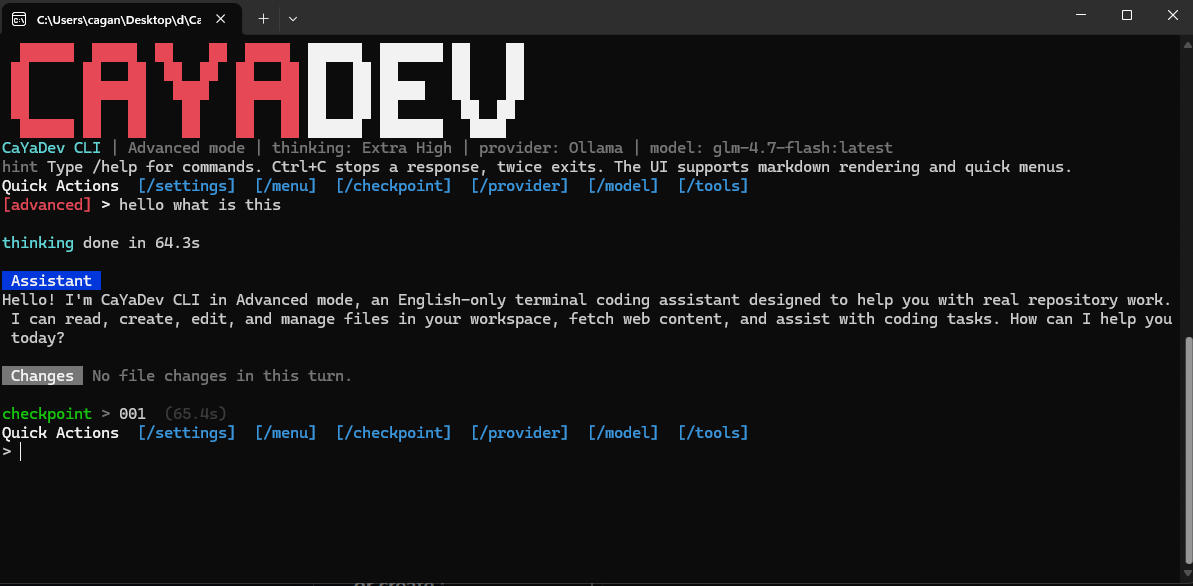
# CaYaDev CLI - CaYaDev CLI is a lightweight open-source AI coding terminal tool built to be simple, flexible, and easy to adapt to smaller models. - The interface is fully English. The product identity follows the CaYaDev visual direction: dark terminal background, sharp red and white accents, and a direct command-line workflow. ## Features - Four runtime modes: advanced, medium, normal, and low - Per-message checkpoints stored locally - File creation, editing, reading, searching, and deletion - Delete actions always ask for permission - Optional web_fetch tool for browsing raw web pages - Optional ask_question tool for interactive clarification - First-run provider setup wizard - Ollama, OpenAI, Claude / Anthropic, OpenRouter, and custom provider support - Rich terminal colors and markdown-style assistant rendering - Thinking spinner with elapsed time - Configurable thinking level: low, medium, high, extra_high - Per-turn file change summary with added and removed line counts - Quick action menu and checkpoint restore flow - Minimal dependency footprint using built-in Node.js modules ## Mode Matrix | Mode | Intent | ask_question | web_fetch | Prompt Style | | --- | --- | --- | --- | --- | | `advanced` | Full capability | Yes | Yes | Full agent prompt | | `medium` | Good balance | No | Yes | Standard agent prompt | | `normal` | Stable default | No | No | Standard coding prompt | | `low` | Better for simpler models | No | No | Extra-constrained low-complexity prompt | ## Requirements - Node.js 20+ - A supported provider account or a local Ollama instance ## Build And Run Install: ```powershell npm install ``` Build: ```powershell npm run build ``` Build a single Windows .exe: ```powershell npm run build:exe ``` The packaged executable is written to: ```text dist-exe/CaYaDevCLI.exe ``` Run from source: ```powershell npm start ``` Run the built copy: ```powershell node dist/src/index.js --mode advanced ``` Run the packaged .exe: ```powershell .\dist-exe\CaYaDevCLI.exe ``` Notes: - The .exe build uses Node.js Single Executable Applications on Windows. - The Windows executable icon is generated from CYEditorLogo2.svg. - Build it on the same Windows machine or CI environment where Node.js is installed. - After blob injection, Windows may report that the original Node signature is no longer valid. Re-sign the final .exe if you plan to distribute it publicly. ## Quick Start 1. Start the CLI: ```powershell npm start ``` 2. On the first launch, the CLI asks for: - Provider - Base URL - API key when required - Model selection or manual model name 3. The selection is stored locally in .cayadev/config.json. You can still override values with CLI flags or environment variables: ```powershell $env:CAYA_PROVIDER="ollama" $env:CAYA_BASE_URL="http://localhost:11434" $env:CAYA_MODEL="qwen2.5-coder:14b" $env:CAYA_API_KEY="" ``` You can also use the binary name after npm link: ```powershell caya --mode normal ``` Default runtime: - Mode: advanced - Thinking: extra_high ## CLI Commands - /help Show commands - /mode Show current mode - /mode <name> Switch mode at runtime - /provider Open the provider setup wizard - /provider current Show the current provider - /model Open the model selector - /model <name> Switch model at runtime - /thinking Show current thinking level - /thinking <level> Set low, medium, high, or extra_high - /settings Open the runtime settings menu - /checkpoint Open the checkpoint restore menu - /checkpoint <id> Restore a specific checkpoint - /menu Open the quick action menu - /tools Show tools available in the current mode - /checkpoints List checkpoints for the current session - /session Show session details - /config Show active runtime config - /exit Exit the app - Ctrl+C Stop the current response - Ctrl+C twice quickly Exit the app ## Checkpoints - Every completed user message creates a checkpoint under .cayadev/sessions/<session-id>/checkpoints/. - The current implementation keeps a full workspace snapshot for each completed turn, excluding common heavy folders such as .git, .cayadev, node_modules, dist, and coverage. This keeps the implementation simple and reliable for an open-source first version, but it is not optimized for very large repositories yet. ## Provider Compatibility > Built-in providers: - `ollama` - `openai` - `anthropic` - `openrouter` - `custom` Protocol support: - OpenAI-compatible chat completions - Anthropic Messages API - Ollama chat API Model listing: - Ollama uses /api/tags - OpenAI-compatible providers use /models when available - Anthropic uses /v1/models - If model listing is unavailable, the CLI falls back to manual model entry ## Agent Protocol The CLI uses a text-based tool protocol so it can work with models that do not support native function calling. Tool call format: ```xml <tool_call>{"tool":"read_file","args":{"path":"src/index.js"}}</tool_call> ``` Final answer format: ```xml <final>Your answer here.</final> ``` The low mode uses a simpler system prompt that reinforces this protocol more aggressively for smaller or weaker models. ## Project Structure ```text src/ core/ banner.js checkpoints.js cli.js config.js modes.js parser.js prompts.js provider.js providers.js reasoning.js render.js tools.js utils.js workspace.js index.js scripts/ build.js test/ parser.test.js ``` ## Notes - The app is intentionally simple and transparent. - Delete actions require approval every time. - The workspace is treated as the current working directory where the CLI starts. - Provider settings are stored locally in .cayadev/config.json, which is ignored by git.

Bilgi & Destek

Gizlilik Politikası

Kişisel verilerinizin güvenliği ve kullanımı hakkında bilgi

Gizlilik Politikası

İletişim

Sorularınız ve önerileriniz için bizimle iletişime geçin

İletişim Sayfası

Kullanım Şartları

Platformumuzun kullanım kuralları ve koşulları

Kullanım Şartları

Hakkımızda

CaYaDev hakkında daha fazla bilgi edinin

Hakkımızda

Destek Merkezi

Sık sorulan sorular, iletişim bilgileri ve teknik destek

Destek Merkezi

Forum

Her proje için ayrı forum alanları