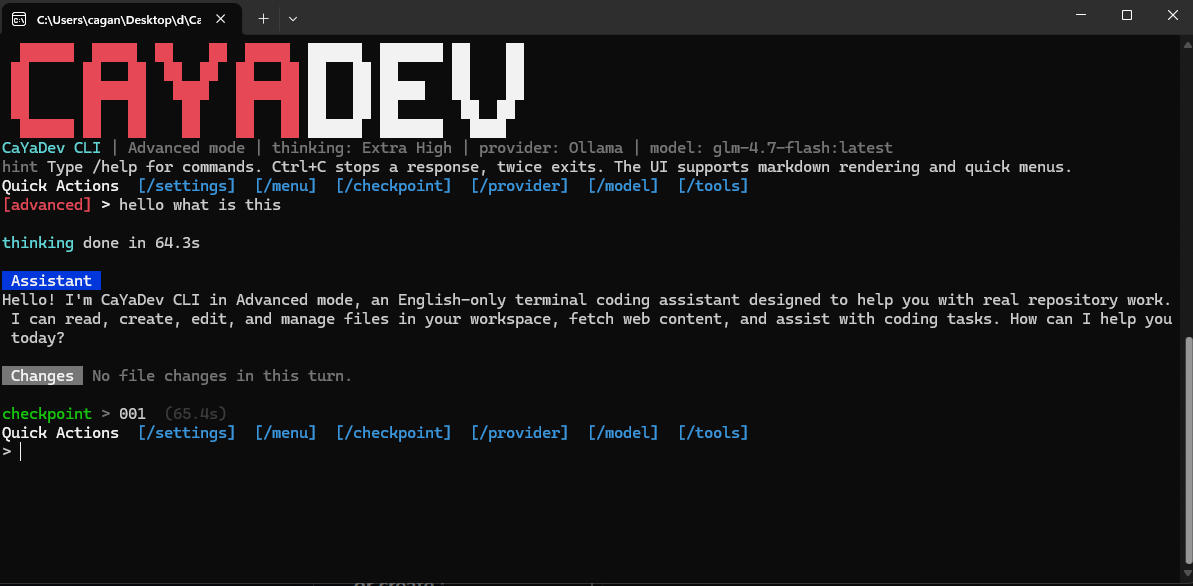
CaYaDev CLI
Published:
CaYaDev CLI is a lightweight open-source AI coding terminal tool built to be simple, flexible, and easy to adapt to smaller models.
CaYaDev CLI CaYaDev CLI is a lightweight open-source AI coding terminal tool built to be simple, flexible, and easy to adapt to smaller models. The interface is fully English. The product identity follows the CaYaDev visual direction: dark terminal background, sharp red and white accents, and a direct command-line workflow. Preview Features Four runtime modes: advanced, medium, normal, and low Per-message checkpoints stored locally File creation, editing, reading, searching, and deletion Delete actions always ask for permission Optional web fetch tool for browsing raw web pages Optional ask question tool for interactive clarification First-run provider setup wizard Ollama, OpenAI, Claude / Anthropic, OpenRouter, and custom provider support Rich terminal colors and markdown-style assistant rendering Thinking spinner with elapsed time Configurable thinking level: low, medium, high, extra high Per-turn file change summary with added and removed line counts Quick action menu and checkpoint restore flow Minimal dependency footprint using built-in Node.js modules Mode Matrix Mode Intent askquestion webfetch Prompt Style advanced Full capability Yes Yes Full agent prompt medium Good balance No Yes Standard agent prompt normal Stable default No No Standard coding prompt low Better for simpler models No No Extra-constrained low-complexity prompt Requirements Node.js 20+ A supported provider account or a local Ollama instance Build And Run Install: Build: Build a single Windows .exe: The packaged executable is written to: Run from source: Run the built copy: Run the packaged .exe: Notes: The .exe build uses Node.js Single Executable Applications on Windows. The Windows executable icon is generated from CYEditorLogo2.svg. Build it on the same Windows machine or CI environment where Node.js is installed. After blob injection, Windows may report that the original Node signature is no longer valid. Re-sign the final .exe if you plan to distribute it publicly. Quick Start Start...
Özellikler
- Four runtime modes: advanced, medium, normal, and low
- Per-message checkpoints stored locally
- File creation, editing, reading, searching, and deletion
- Delete actions always ask for permission
- Optional web_fetch tool for browsing raw web pages
- Optional ask_question tool for interactive clarification
- First-run provider setup wizard
- Ollama, OpenAI, Claude / Anthropic, OpenRouter, and custom provider support
- Rich terminal colors and markdown-style assistant rendering
- Thinking spinner with elapsed time
- Configurable thinking level: low, medium, high, extra_high
- Per-turn file change summary with added and removed line counts