Minecraft CaYa Bot Panel
Proje Görselleri (1)
En Son Versiyon
Proje Açıklaması

Minecraft CaYa Bot Panel
A browser-based, multi-bot control and automation panel for Minecraft Java Edition, powered by Mineflayer.






Easy installation
Requirements
- Node.js 18 or newer — Node.js 22 LTS is recommended.
- A Minecraft Java Edition server that you own or are allowed to use bots on.
- Bots can join with offline names or a Microsoft account (device code). See Microsoft accounts.
1. Download and install
git clone https://github.com/CaYatur/Minecraft-CaYa-Bot-Panel.git
cd Minecraft-CaYa-Bot-Panel
npm install
2. Start the panel
npm run dev
Open:
- Web panel:
http://localhost:3000 - API and Socket.IO:
http://localhost:3001
3. Connect your first bot
- Open Servers and create a server profile.
- Return to Panel and select Add Bot.
- Choose the server, bot username, and Minecraft version.
- Start the bot and open its detail page.
- On that page, Login picks a Microsoft account or a server password, 24/7 sets autostart and anti-AFK, and Bot view opens the local 3D page.
Newer servers and anti-cheats
- Servers newer than the bot library (for example 26.3 while bots speak up to 26.1): the server profile's ViaProxy setting (Auto by default) starts ViaProxy on this computer and the bot joins through it, even when the server has no ViaBackwards. It needs Java 17+, downloads ViaProxy once, and picks up newer ViaProxy releases by itself. Offline-mode servers only.
- Anti-cheats on 1.21.2+ (Grim and similar): the panel sends the movement packets the game client sends (input keys, rotation, sprint, tick end), so bots are not pulled back on every step.
The server listens on
127.0.0.1by default. This is intentional: the panel has powerful bot-control endpoints and should not be exposed publicly without an authentication layer and a reverse proxy.
Production build
npm run typecheck
npm run build
npm run start -w server
After a production build, the Node.js server serves the compiled web interface from:
http://localhost:3001
Optional server environment variables:
CAYA_HOST=127.0.0.1
CAYA_PORT=3001
Screenshots
Captured directly from the current application interface in English using seeded local demonstration data. The screenshots do not contain real server credentials or private player data.

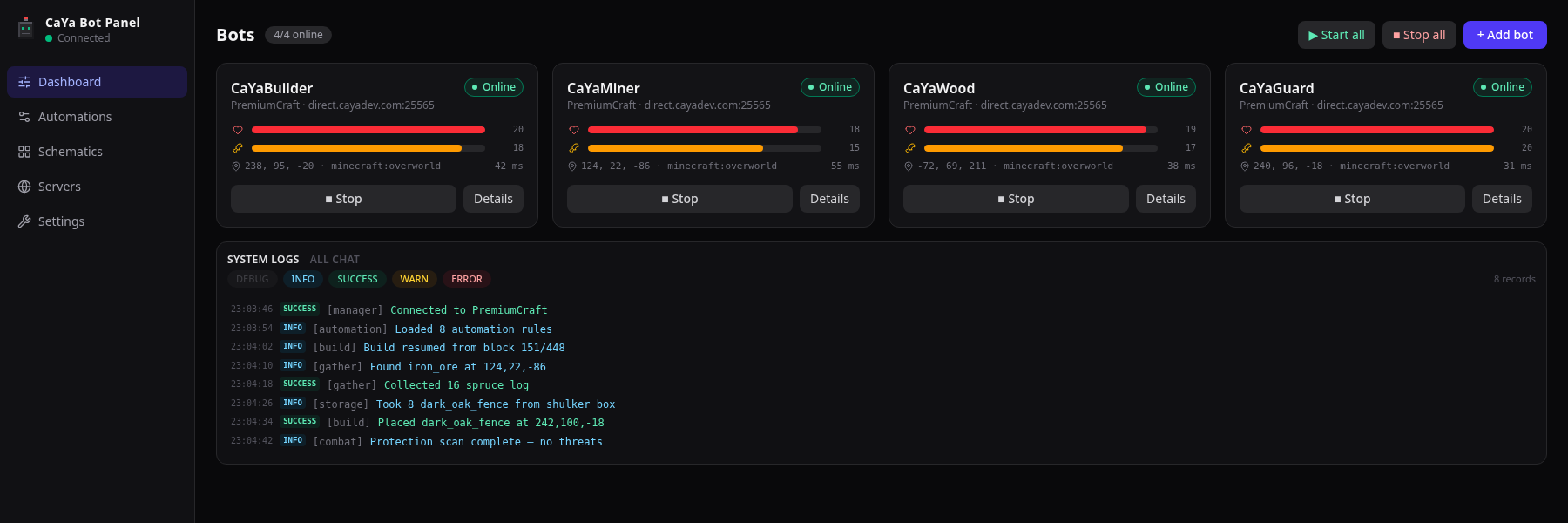
Multi-bot dashboard and live system logs
Monitor bot status, health, hunger, position, latency, active work, and application events from one screen.

Advanced automation rule configuration
Configure trigger permissions, cooldowns, concurrency policy, runtime limits, initial variables, and reusable event context.

Nested IF/ELSE and task-result flow
Build nested AND/OR condition groups, wait for queued work, save results, retry failed actions, and branch by task status.

Drop-specific-items automation
Drop an exact amount, every matching stack, or only the amount above a retained inventory threshold. Protected items can be preserved and the discarded count can be used by later nodes.

Schematic construction
The build workspace includes transforms, origin selection, live progress, material deficits, partial-build behavior, collection controls, and scaffold cleanup.

What is CaYa Bot Panel?
CaYa Bot Panel is a local web application for creating and operating multiple Minecraft Java bots from one interface. It combines live bot monitoring, inventory management, movement, combat, survival behavior, resource gathering, recursive crafting, schematic construction, and a programmable automation engine. Microsoft sign-in, 24/7 presence, Discord alerts, and a local first-person view are included.
The project is designed around three principles:
- Visible state: chat, logs, inventory, tasks, health, position, combat, build progress, and errors are shown in the panel in real time.
- Task-oriented behavior: long-running operations are placed into a priority-aware task queue instead of being executed as uncontrolled background loops.
- Permission and realism: chat-controlled automations can be restricted to authorized players, and movement/combat behavior is designed to remain physically achievable by a normal player.
Main features
| Area | Capabilities |
|---|---|
| Multi-bot management | Multiple bot profiles, multiple server profiles, start/stop all, autostart, reconnect handling, independent runtime state |
| Live dashboard | Connection state, health, hunger, XP, ping, dimension, coordinates, current task, queue, system logs and combined chat |
| Chat | Live Minecraft chat, panel-to-server messages, parsed player/server lines, rate limiting and authorized command senders |
| Inventory | Live equipment, main inventory and hotbar, equip/use actions, drop-specific automation, protected-item policies and best-gear support |
| Movement | Go to coordinates, follow players, waypoints, sprint control, humanized turning, edge safety, bridging, parkour and ladder/vine handling |
| Water movement | Surface assistance, current handling, ascent support and more stable water-to-land transitions |
| Combat | Attack, self-defense, flee, protect players, target tracking, hostile-mob clearing, configurable reach/reaction/CPS behavior |
| Survival | Auto-eat, food acquisition, water safety, hazard escape, bucket handling and configurable fall protection |
| Smart gathering | Separate surface and underground strategies, wood collection, ore mining, arbitrary block collection and dropped-item pickup |
| Farming | Till soil with a hoe, plant/harvest/replant wheat, carrots, potatoes, beetroot, melon and pumpkin, and run a continuous farm loop that deposits produce into a chosen chest — from the panel, automations or the AI agent |
| Recursive crafting | Recipe dependency planning, raw-material acquisition, crafting-table use, furnace chains and storage withdrawal |
| Storage | Chests, trapped chests, barrels, placed shulker boxes and temporary use/recovery of portable shulker boxes — deposits are verified (chest-full is reported honestly) and a specific chest can be targeted by coordinates |
| Schematic building | .schem, .schematic, .litematic and .caya.json, rotation, mirroring, material planning, partial building and scaffold cleanup |
| AI agent (MCP + Ollama) | Drive bots with an LLM: a local Ollama model plays in-game (chat replies, tasks, creative building) or any MCP client (Claude Code, Cursor, VS Code…) uses the bots as tools — 94 tools, trust system, persistent memory, autopilot |
| Advanced automations | Nested IF/ELSE, AND/OR/NOT groups, variables, task-result capture, loops, waits, retries, timeouts and error branches |
| Localization | English, Turkish and automatic locale detection |
| Microsoft accounts | Device-code sign-in for online-mode servers, a local token cache, and per-bot offline or Microsoft login |
| 24/7 mode | Autostart with an optional delay, reconnect after a drop, and anti-AFK move, interval, and hold settings |
| Server login | /login or /register when the server asks, on every join, or on the first join, including a custom {password} command |
| Discord | Optional death, disconnect, and task alerts, slash commands, and a two-way chat bridge |
| Templates | Import, export, and bundled automation packs that stay off until you enable them |
| Menus & item use | Right-click the held item (for example a lobby compass), read the menu that opens with custom names and lore, click a slot, switch hotbar slots and close the menu — from the Inventory tab, REST, Socket.IO or MCP. Menu items can be clicked by name or lore text instead of a slot number. Automation rules have the same actions plus a window_opened trigger, and the Join game mode on spawn blueprint joins a mode automatically after each spawn |
| Actions for selected bots | Checkboxes on Dashboard bot cards and an action bar: start, stop, stop work, chat ({bot} placeholder), use held item, hotbar, menu slot click and close menu on many bots at once, with a result per bot. Also POST /api/bots/bulk-action and the bulk_action MCP tool |
| Bot view | A localhost 3D page, a still first-person PNG, and a text description of what is in view. 26.x bots render with 1.21.4 textures and nearest-block stand-ins; y -64 to 319 is drawn |
| Persistence | Server profiles, bot profiles, rules, waypoints, schematic indexes and logs stored locally as JSON/files |
MCP / AI agent system
The MCP / AI tab connects the bots to a language model in two independent ways. Both paths share the same tool registry (94 tools), and every tool executes through the normal task queue and realism layers — the model can only do what a player could do through the panel.
┌─────────────────────┐      tools       ┌──────────────────┐
│ Ollama (local LLM)  │ ───────────────► │                  │
│ in-game agent       │                  │  Agent tool      │      TaskQueue /
└─────────────────────┘                  │  registry (94)  │ ───► RealismLayer ───► Minecraft
┌─────────────────────┐   /mcp endpoint  │                  │
│ Claude Code, Cursor │ ───────────────► │                  │
│ VS Code, any client │  (JSON-RPC/HTTP) └──────────────────┘
└─────────────────────┘
Enable the master switch in MCP / AI, then use either or both modes.
Mode 1 — In-game AI with Ollama
A local Ollama model drives the bot inside the game: it answers chat, accepts tasks, gathers, crafts, fights (if allowed) and designs/builds structures.
Install Ollama and pull a tool-capable model:
ollama pull qwen2.5 # or: llama3.1, qwen3, mistral-nemo, gpt-ossIn MCP / AI → Ollama, pick the model (the dropdown lists your installed models) and enable the agent.
Under Bot Agents, toggle Agent on for at least one bot.
Talk to it from the Agent Chat console — or in game chat by addressing the bot by name (
CaYa selam, 10 demir kaz).
In-game behavior is fully configurable: reply only when addressed, whisper handling, per-player cooldown, max reply length, persona text and reply language. Turning in-game replies off limits conversation to the panel's Agent Chat.
Small models (≤8B) can misuse tools or hallucinate. For serious use prefer stronger tool-calling models such as
qwen3.5:35borgpt-oss:20b.
Mode 2 — External MCP clients (Claude Code, Cursor, VS Code…)
The panel exposes a Model Context Protocol server at http://127.0.0.1:3001/mcp (Streamable HTTP, JSON-RPC 2.0). Any MCP-capable tool can then control the bots.
Claude Code (CLI):
claude mcp add --transport http caya-bot http://127.0.0.1:3001/mcp
Cursor — .cursor/mcp.json (project) or ~/.cursor/mcp.json (global):
{ "mcpServers": { "caya-bot": { "url": "http://127.0.0.1:3001/mcp" } } }
VS Code (Copilot agent mode) — .vscode/mcp.json:
{ "servers": { "caya-bot": { "type": "http", "url": "http://127.0.0.1:3001/mcp" } } }
Windsurf — ~/.codeium/windsurf/mcp_config.json:
{ "mcpServers": { "caya-bot": { "serverUrl": "http://127.0.0.1:3001/mcp" } } }
Gemini CLI — ~/.gemini/settings.json:
{ "mcpServers": { "caya-bot": { "httpUrl": "http://127.0.0.1:3001/mcp" } } }
Claude Desktop and other stdio-only clients — bridge with mcp-remote in the client's MCP config:
{
  "mcpServers": {
    "caya-bot": {
      "command": "npx",
      "args": ["-y", "mcp-remote", "http://127.0.0.1:3001/mcp"]
    }
  }
}
Config formats evolve — if a snippet doesn't match your client version, the only facts you need are: transport = Streamable HTTP, URL =
http://127.0.0.1:3001/mcp. When Require bearer token is enabled in the panel, also sendAuthorization: Bearer <token>(Claude Code:--header "Authorization: Bearer <token>"; JSON configs usually accept aheadersobject).
Most tools accept an optional bot argument; when exactly one bot has the agent enabled it is picked automatically. Typical session: list_bots → get_status → mine_ore { ore: "iron", count: 10 } → get_tasks.
Tool categories
Every category can be toggled in Tool Permissions; info/perception tools are always on.
| Category | Tools |
|---|---|
| Info / perception (always on) | list_bots, get_status, get_inventory, get_open_window, server_commands (read-only command tree, optional filter), bulk_action (each action also needs its own category), look_around, find_blocks, get_recent_chat, get_tasks, get_build_status, list_waypoints, list_schematics, list_trusted_players, stop_all, account_list, account_login_start, account_login_status, account_remove, bot_set_account, bot_auth_status |
| Chat | send_chat, send_whisper |
| Movement | goto, goto_player, follow_player, goto_waypoint, interact_block |
| Gathering | collect_wood, mine_ore, collect_blocks, collect_drops, hunt_animals |
| Farming | till_soil, plant_crops, harvest_crops, farm_cycle (continuous farm loop with chest deposit) |
| Crafting & survival | craft_item, preview_craft_plan, cook_food, eat_now, sleep_in_bed, wake_up |
| Inventory / storage | deposit_items, withdraw_items, give_item_to_player, drop_items, equip_item |
| Menus & item use | use_held_item (right-click, e.g. a lobby compass), select_hotbar_slot, click_window_slot, close_window (inventory category). click_window_slot accepts slot or item (menu item name or lore text) and waitWindowMs. See docs/gui-and-bulk.md |
| Building (creative) | plan_structure, build_structure, build_schematic, stop_build |
| Defense | set_self_defense, protect_player, flee, stop_combat |
| Attack (off by default) | attack_player, clear_hostile_mobs |
| Trust | trust_player, untrust_player |
| Memory | remember, recall_memories, forget_memory |
| Waypoints | save_waypoint_here |
| Utility mode (off by default) | server_command, fly_to, plus mine_ore { utility: true } |
| Platform | 24/7, Discord, templates, and bot view. The names are in the next section |
Platform tools
These are registered with the other agent tools and stay in the info category, so they remain available while MCP is on. Passwords, tokens, and webhook URLs are write-only or masked.
| Area | Tools |
|---|---|
| 24/7 | always_on_get, always_on_set, login_plugin_set, uptime_stats, reconnect_status, reconnect_cancel |
| Discord | discord_status, discord_notify, discord_events_set, discord_bridge_get, discord_bridge_set, discord_allowlist_get, discord_allowlist_set, discord_recent_messages |
| Templates | template_list, template_get, template_export, template_import, template_delete |
| Bot view | bot_view_describe, bot_view_screenshot, bot_view_start, bot_view_stop, bot_view_status |
login_plugin_set can store a password and never returns it. discord_notify posts through the saved webhook. bot_view_screenshot returns a still first-person PNG and does not move the bot. bot_view_start only starts the local panel page. template_run and template_stop are not registered. Field notes: docs/always-on.md, docs/discord.md, docs/templates.md, docs/viewer.md.
Creative building without schematics
The model designs structures itself by composing parametric shapes — box, hollow_box, floor, wall, pillar, line, cylinder, ring, sphere, dome, pyramid, cone, stairs, roof_gable and raw blocks. Placing air carves earlier cells, which gives it doors, windows and interiors. plan_structure dry-runs the design (size + material list vs. inventory), build_structure hands it to the real build engine (scaffolding, material collection, progress, repair) and get_build_status streams stage-by-stage progress back to the model. Designs are saved into the schematic library as AI · <name>, and existing library schematics can be built with build_schematic.
Trust system
When the trust system is on, only players in the trusted list can give the agent commands from game chat. Untrusted players are either ignored or get chat-only replies (no tools) — configurable. The model itself may manage the list with trust_player only if you explicitly allow it.
Autopilot
Give a bot a goal ("collect 64 oak logs, then build a small cabin") and enable Autopilot: the model periodically decides the next concrete step on its own, wakes early on task completion/failure or when attacked, and stops when it reports the goal complete.
Utility mode (permitted servers only)
Off by default. On your own server (or one that explicitly allows automation) you can unlock non-realistic paths for the model: server slash commands (/tp, /give, /gamemode… — requires OP), creative flight (fly_to) and fast utility mining. Combat realism (look-before-hit, reach, human timing) is never affected by this mode.
Memory
remember / recall_memories give each bot a persistent long-term memory (data/agent-memory/) that survives restarts — base locations, owners, promises.
Advanced automation engine
The automation system can be used as a simple trigger-condition-action editor or as a nested workflow engine. Rule packs can be imported and exported as templates. Bundled examples (Auto farm, AFK fisher, Mob grinder guard, Auto eat and sleep) arrive disabled. See docs/templates.md.
Triggers
Rules can react to events including:
- Chat text or slash-style commands
- Bot being attacked
- A player entering or leaving range
- A follow target moving out of range
- Player join or leave events
- Health or hunger thresholds
- Item-count thresholds
- Items being gained
- Inventory becoming full
- Timed intervals
- Bot spawn and death
- Task completion or failure
Conditions
Rules can inspect:
- Online/offline state
- Whether the task queue is idle or busy
- Active task type and task label
- Combat mode and active follow target
- Health and hunger
- Item existence and item count
- Nearby or distant players
- Dimension
- Day/night state
- Arbitrary values and previous action results
Advanced flows support nested condition groups:
ALL
├─ bot is idle
├─ health >= 12
└─ ANY
   ├─ iron_ingot count < 32
   └─ {forceRun} is truthy
The available group operators are:
ALL— every child must be trueANY— at least one child must be trueNOT— invert a nested condition
Flow nodes
The visual advanced editor supports:
- Action — run a bot action
- IF / ELSE — create nested conditional branches
- Set variable — store a value in the workflow context
- Wait — wait for a duration or until a condition is true
- Repeat — fixed-count or conditional loops
- Stop flow — complete or fail the workflow deliberately
Each action node can also define:
- A result variable name
- Whether to wait for the created task to finish
- Timeout
- Retry count
- Delay between retries
- Continue-on-error behavior
- A node-specific error branch
Task-result branching
An action can store its result under a custom name:
saveAs: ironResult
waitForTask: true
Later nodes can read:
{ironResult.status}
{ironResult.taskId}
{ironResult.taskType}
{ironResult.label}
{ironResult.error}
{ironResult.progressDone}
{ironResult.progressTotal}
Typical statuses include:
completed · queued · done · failed · cancelled · timeout
Example workflow
WHEN authorized player sends: /iron 10

IF bot is idle
  ACTION Smart collect iron_ingot
    count: {arg0}
    amount mode: add
    wait for task: yes
    save result as: ironResult

  IF {ironResult.status} equals done
    SEND CHAT: Collected {arg0} additional iron.
  ELSE
    PANEL NOTIFY: Iron task failed: {ironResult.error}
ELSE
  SEND CHAT: I am currently busy with {task}: {label}.
Context variables
Common variables available to rules include:
{player}             chat sender or related player
{text}               raw chat message
{command}            parsed command name
{arg}, {arg0}...     command arguments
{task}, {taskType}   active task type
{label}               active task label
{taskState}           running, idle, none...
{busy}, {idle}        numeric state flags
{queueLength}         queued task count
{queueTypes}          comma-separated task types
{health}, {food}      current vitals
{position}            x,y,z
{dimension}           current dimension
{combatMode}          current combat mode
{activeTarget}        combat target
{followPlayer}        followed player
{branch}              then or else
{error}               current error message
{failedAction}        action that failed
{last.status}         previous action result
{loopIndex}           zero-based loop index
{loopNumber}          one-based loop index
{attempt}             retry attempt number
{runId}               advanced-flow run identifier
Rules are protected by cooldown and maximum-trigger-per-minute settings. Advanced flows additionally support a maximum runtime, maximum step count, and concurrency policy.
Smart resource gathering
Gathering is strategy-aware. The bot does not treat every item as an ore and does not use the same pathing policy for trees and underground resources.
Surface resources
For logs and similar surface resources, the gatherer prioritizes:
- Nearby dropped items
- Visible matching trees or blocks
- Surface-friendly paths
- The lowest reachable log in a tree
- Connected logs from the same tree
- Temporary blacklisting of unreachable targets
Terrain tunneling is disabled for normal wood collection, preventing the bot from mining through mountains just to reach a tree.
Underground resources
Ore collection uses a separate strategy that can allow controlled digging and underground pathfinding. Unreachable or invalid targets are not chased indefinitely.
Amount modes
Gather and mining actions expose two different amount semantics:
| Mode | Example with 10 items already in inventory |
|---|---|
Add +N |
Request 10 → final target is 20 |
Target total N |
Request 10 → task is already complete |
This distinction is important for automation commands versus build/craft dependency planning.
Dropped items
The bot can collect item entities produced by mining, tree cutting, crafting, combat, or manual drops. Collection is verified against inventory changes rather than assuming that walking near an entity succeeded.
Crafting and dependency planning
The smart crafting layer recursively resolves recipes and their source materials.
Examples:
spruce_planks
└─ spruce_log

dark_oak_fence
├─ dark_oak_planks
│  └─ dark_oak_log
└─ sticks
   └─ planks

iron_ingot
├─ raw_iron / iron_ore
└─ furnace fuel
The planner can:
- Use items already in inventory
- Pick up nearby dropped items
- Withdraw from nearby storage
- Resolve and craft intermediate ingredients
- Gather missing raw materials
- Use furnace-based production when required
- Continue a larger build or task after materials become available
Storage and shulker-box support
The storage layer can search and withdraw matching materials from:
- Chests
- Trapped chests
- Barrels
- Shulker boxes placed in the world
- Shulker boxes carried in the bot inventory
World storage is opened but not destroyed. A portable shulker can be placed temporarily at a safe position, opened, used, and then broken and collected again. If recovery cannot be verified, the operation fails visibly instead of silently losing the box.
Schematic building
Supported formats:
WorldEdit:   .schem / .schematic
Litematica:  .litematic
CaYa JSON:   .caya.json
The build system provides:
- Schematic library and upload interface
- Size and block-count preview
- Rotation:
0°,90°,180°,270° - Mirror X and Mirror Z
- Bot-position or custom origin
- Nearby-first or layer-first placement
- Live block animation and recent-block history
- Real-time material requirements
- Automatic missing-material collection
- Partial building when not every material is available
- Crafting and storage integration
- Scaffold block configuration
- Scaffold cleanup
- Placed, skipped and failed counters
- Cancellation and task interruption recovery
Temporary placement failures can be retried. Material usage and the remaining material table are updated during the build rather than being calculated only once at the beginning.
Movement system
The movement layer is built around mineflayer-pathfinder with additional project-level safety and stability logic.
Capabilities include:
- Go to coordinates
- Follow a player with configurable distance
- Saved waypoints
- Controlled sprint behavior
- Smooth/humanized turning
- Stuck detection and route refresh
- Edge and drop safety
- Optional gap bridging
- Parkour attempts before bridging
- Configurable 2–4 block gap handling
- Ladder, vine and scaffolding climbing
- Water-current and surface assistance
- Controlled digging and scaffold policies per task type
Movement ownership is coordinated between pathfinding, combat, building, survival, and manual controls to reduce conflicting look or key-state updates.
Combat and companion behavior
Combat is configurable per bot.
Available behavior includes:
- Direct player attack
- Hostile-mob clearing
- Self-defense against mobs, players, both, or neither
- Fleeing at a configured health threshold
- Protecting one or more players
- Follow/attack/protect companion toggles
- Target reach, reaction delay, turn speed and CPS limits
- Weapon selection
- Optional nearby-threat cleave behavior
- Death-position and loot-recovery support
- Unreachable-target detection and temporary target suppression
- Hunter / lock-on, with scan, chase, and flee settings. While it is on, other actions stay locked and chat still works
The project intentionally avoids teleporting, attacking through walls, or instantaneous aim snapping.
Survival systems
Survival behavior can be configured separately for each bot:
- Automatic eating below a hunger threshold
- Food blacklist
- Food acquisition, hunting and cooking workflows
- Water-surface and land-seeking guard
- Fire, lava and magma escape logic
- Optional water-bucket use during hazard escape
- Empty-bucket water/lava collection
- Fall-risk estimation
- MLG-style landing attempts when suitable items and surfaces are available
- Optional recovery of placed water, boats or blocks
Fall protection is best-effort and depends on latency, available inventory, the server tick rate, anti-cheat behavior, and the geometry below the bot.
Inventory and chat
Inventory
The panel displays:
- Armor slots
- Offhand
- Main inventory
- Hotbar and selected slot
- Stack count
- Durability
- Enchantments
Available actions include selecting, equipping and using items, together with configurable keep/banned-item policies.
Drop-specific-items automation
Automation rules can remove inventory items without relying on a generic full-stack drop command. The action supports:
- Drop
Nitems — discard up to an exact requested amount - Drop all matches — discard every matching inventory stack
- Keep
N, drop the excess — retain a minimum stock and discard only the surplus - Exact name or name contains matching
- Optional protection for items in the bot's
keepItemslist - Optional failure when no matching item exists
- Optional full-amount enforcement
- Task-result capture through fields such as
{dropResult.status}and{dropResult.progressDone}
Equipment and offhand slots remain protected. Because dropping is irreversible, interrupted drop tasks are not silently requeued.
Chat
The chat interface separates Minecraft chat from internal application logs. System errors and task diagnostics stay in the panel unless a user-created automation explicitly sends a Minecraft message.
Chat-triggered rules can be restricted to each bot's authorized player list. A global rate limiter reduces spam and kick risk.
Full cancellation and task priorities
The task system follows a priority model similar to:
survival emergency
> self-defense
> direct user command
> automation work
> idle behavior
A full cancellation operation stops more than the visible queue. It also invalidates active automation runs, clears movement goals, releases control states, cancels digging/build helpers, and prevents the same automation from immediately recreating the task during a short suppression window.
Accounts, 24/7, Discord, and view
These controls live on the bot page and in Settings. Each one stays off until you turn it on.
Microsoft accounts
Bots can join online-mode servers with a Microsoft account. Offline bots stay offline. Sign in from Accounts with the device code. The panel keeps the cache and does not ask again until the session expires or you sign out. One account cannot be online on two bots at once. Details: docs/microsoft-auth.md.
24/7 mode
The header Autostart checkbox and the one on the 24/7 tab are the same setting. When it is on, the bot joins after the panel opens. An optional delay of 0–300 seconds waits before that join.
A bot that is already started retries after a drop or kick: 5 seconds, then 10, 30, and 60. A ban, whitelist, duplicate login, or Microsoft auth failure stops those retries.
Anti-AFK is separate and off by default. The tab sets the move (mixed, look, sneak, jump, swing, or step), the seconds between moves (5–600), and how long sneak, jump, and step stay held (100–2000 ms). While it is on, goto, combat, building, farming, and other tasks are refused. Chat still works. There is no sprint. Details: docs/always-on.md.
Server login
The Login tab can send a server password in three ways: only when a server line asks, on every join, or register on the first join and login after that. /login and /register can send the password once, twice, or through a custom command that contains {password}. A player line such as <Steve> /login does not send the password. The secret is stored encrypted in data/login-secrets.json.sealed, exactly as typed. Chat shows the command with the password replaced by dots.
Discord
Discord is optional. A webhook can report death, disconnect, reconnect, mention, whisper, task finished, task failed, and low health. Slash commands need a bot token and a guild id. The chat bridge posts Minecraft lines as [MC] and writes Discord lines back as [Discord]. Tokens and webhook URLs are stored locally and masked in status. Details: docs/discord.md.
Bot view
Bot view opens a 3D page on 127.0.0.1 only while that tab sends a heartbeat. Closing it stops the page after about 20 seconds. A snapshot is a still first-person PNG, up to 1280×720, and does not turn the bot. canvas and headless WebGL ship with the panel. Bots on versions newer than the viewer's textures (for example 26.x through ViaVersion) render with 1.21.4 textures and a short note; blocks 1.21.4 lacks are drawn as the closest older block, a full block with no match as stone, and anything else is skipped. The whole 1.18+ height (y -64 to 319) is drawn, so flat worlds and underground bots show too. Details: docs/viewer.md.
Menus and bulk actions
The Inventory tab shows the open menu (custom names, lore, slot numbers) with a Use held item button and left, right or shift clicks. On the Dashboard, tick the checkbox on each bot card and use Actions for selected bots to run the same action on all of them. The Chat tab lists the commands the server sent for this bot; clicking a row fills the chat box and does not send it. REST: GET /api/bots/:id/window, POST /api/bots/:id/gui, POST /api/bots/bulk-action. The read-only MCP tool is server_commands. Details: docs/gui-and-bulk.md.
In Automations the Menu category has the actions Use held item, Select hotbar slot, Click menu slot (by item name or lore, or by slot number) and Close menu, and the Window opened trigger fires when a menu whose title contains the given text opens. The Join game mode on spawn blueprint waits 2 s after bot_spawned, right-clicks the compass and clicks the mode by name. Rules with these actions can also be created over MCP with template_import (apply: true).
Architecture
flowchart LR
    Browser[React Web Panel] <-->|REST + Socket.IO| API[Express / Socket.IO Server]
    API --> Manager[BotManager]
    API --> Rules[Automation RuleEngine]
    Manager --> B1[BotInstance 1]
    Manager --> B2[BotInstance 2]
    Manager --> BN[BotInstance N]

    Rules --> B1
    Rules --> B2
    Rules --> BN

    B1 --> Queue1[Priority TaskQueue]
    B1 --> Modules1[Movement · Combat · Survival · Gather · Craft · Build]
    B2 --> Queue2[Priority TaskQueue]
    B2 --> Modules2[Movement · Combat · Survival · Gather · Craft · Build]

    B1 <-->|Minecraft protocol| Server[Minecraft Java Server]
    B2 <-->|Minecraft protocol| Server
    BN <-->|Minecraft protocol| Server

    API <--> Data[(data/*.json + schematics + logs)]
Technology stack
| Layer | Technology |
|---|---|
| Bot runtime | Mineflayer |
| Pathfinding | mineflayer-pathfinder |
| Tool selection | mineflayer-tool |
| Armor handling | mineflayer-armor-manager |
| Schematic parsing | prismarine-schematic, prismarine-nbt |
| Backend | Node.js, Express, Socket.IO, TypeScript |
| Frontend | React, React Router, Zustand, Vite, Tailwind CSS |
| Persistence | Local JSON and file storage |
Project structure
Minecraft-CaYa-Bot-Panel/
├─ data/                         Local persistent state
│  ├─ bots.json
│  ├─ servers.json
│  ├─ rules.json
│  ├─ waypoints.json
│  ├─ schematics/
│  └─ logs/
├─ scripts/                      Smoke and behavior test scripts
├─ server/
│  └─ src/
│     ├─ api/                    REST and Socket.IO adapters
│     ├─ constants/              Shared event names
│     ├─ core/                   BotManager, BotInstance, TaskQueue
│     ├─ modules/
│     │  ├─ agent/               MCP endpoint, Ollama agent, tool registry, memory
│     │  ├─ alwaysOn/            Autostart, anti-AFK, and the login plugin
│     │  ├─ auth/                Microsoft device-code accounts
│     │  ├─ automation/          Rules, blueprints and advanced flow nodes
│     │  ├─ discord/             Webhook events, slash commands, and the chat bridge
│     │  ├─ build/               Schematic parsing and construction
│     │  ├─ catalog/             Minecraft item/block catalog
│     │  ├─ chat/                Chat parsing
│     │  ├─ combat/              Combat and companion behavior
│     │  ├─ craft/               Crafting and recursive dependency planning
│     │  ├─ gather/              Surface, ore and drop gathering
│     │  ├─ inventory/           Inventory actions and snapshots
│     │  ├─ movement/            Pathfinding, parkour and water assistance
│     │  ├─ survival/            Food, hazard, water and fall guards
│     │  ├─ templates/           Automation template import and export
│     │  ├─ view/                Local 3D page and first-person snapshots
│     │  └─ world/               Shared world memory
│     ├─ persistence/            JSON store helpers
│     ├─ types.ts
│     └─ index.ts
├─ test-server/                  Local Flying Squid test server
├─ web/
│  └─ src/
│     ├─ components/             Bot panels and advanced flow editor
│     ├─ i18n/                   English and Turkish dictionaries
│     ├─ lib/                    API, sockets and shared UI types
│     ├─ pages/                  Dashboard, bots, accounts, rules, schematics, MCP/AI, servers, settings
│     ├─ stores/                 Zustand state
│     └─ App.tsx
├─ TODO.md                       Detailed roadmap and design decisions
├─ package.json                  npm workspaces and root scripts
└─ README.md
Commands
| Command | Purpose |
|---|---|
npm run dev |
Start backend and web panel in development mode |
npm run dev:server |
Start only the backend |
npm run dev:web |
Start only the Vite frontend |
npm run typecheck |
Run strict TypeScript checks in both workspaces |
npm run build |
Build backend and frontend for production |
npm run start -w server |
Start the compiled production server |
npm run testserver |
Start the local offline test server on 127.0.0.1:25566 |
npm run smoke |
Run an end-to-end smoke test |
npm run test:combat |
Run combat-focused checks |
npm run test:full |
Run the broader behavior suite |
npm run test:grok |
Run the extended smoke suite included in the repository |
npm run test:movement |
Fall damage, parkour gap, door, look, and food rules. No server |
npm run test:build-rules |
Placement, facing, scaffold, schematic, and weapon rules. No server |
npm run test:build |
Checks that npm run build wrote server/dist and web/dist |
npm run test:baseline |
Current-behavior contract, including chat, flat movement, the flying-squid parkour course (gap, stairs, ladder, a refused same-level 4-block jump, and an MLG), inventory, and job queues. Needs the API and npm run testserver |
npm run test:platform |
Always-on backoff, login-plugin prompts, template validation, Discord bridge rules, window and bulk helpers, and the 26.x viewer fallback (block translation, every-block and below-y=0 renders). See docs/always-on.md, docs/discord.md, docs/templates.md, and docs/viewer.md |
npm run test:security |
Secret encryption and migration, webhook URL rules, Host/Origin rules, ACL arguments, viewer limits. No server |
npm run test:packaging |
Windows package config (Setup and portable zip, checksums, left-out Bedrock data and viewer build textures) and that viewer, Discord, canvas and gl ship with the app. No server |
npm run test:protocol |
1.21.2+ movement packets (input, rotation, sprint ids, tick end, teleports, attributes) and ViaProxy helpers. No server. The live anti-cheat check is in test-server/README.md |
npm run test:gui |
Use held item, menu reads and clicks, and bulk actions over REST and MCP against the test server's "Server Selector" compass menu. Needs the API and npm run testserver |
npm run test:all |
Auth, security, packaging, UI, platform, movement rules, protocol, build rules, the baseline contract, and the GUI test |
GitHub Actions tests |
On every push and pull request: typecheck, build, build smoke, then test:all against the compiled server and flying-squid |
npm run test:full / test:grok / smoke |
Older scenario scripts. Not part of test:all |
Local test server
A lightweight offline test server is included for development:
npm run testserver
It listens on:
127.0.0.1:25566
Then, in a second terminal:
npm run dev
npm run smoke
See test-server/README.md for additional test-server guidance.
Data and backups
Runtime data is stored under data/. Keep backups of this directory before large migrations or experimental changes.
Important files include:
data/servers.json       server profiles
data/bots.json          bot profiles and per-bot settings
data/rules.json         automation rules and advanced flows
data/waypoints.json     saved coordinates
data/schematics/        uploaded schematic files and index
data/logs/              application logs
data/auth/              Microsoft token cache (*.sealed, encrypted)
data/login-secrets.json.sealed   server login passwords (encrypted)
data/discord-secrets.json.sealed Discord webhook and bot token (encrypted)
data/mcp-token.json.sealed       MCP bearer token (encrypted)
data/uptime.json        session uptime and recent disconnects
Secret files are encrypted with a key that the desktop app keeps in the OS keychain, so they only open on the same Windows account. In plain npm run dev there is no keychain key: the files stay plain and the panel shows a warning banner.
Do not commit real server addresses, private player lists, token caches, or the secret files above to a public repository.
Security notes
- The API binds to
127.0.0.1by default. - There is currently no multi-user login or role-based web authentication.
- The API, Socket.IO and
/mcpaccept only loopbackHostnames and refuse requests from other web pages (Origincheck), which blocks DNS rebinding and cross-site requests. To reach the panel by another name on your own network, bind it withCAYA_HOSTand list the name inCAYA_ALLOWED_HOSTS(comma separated). - Tokens (including the MCP bearer token), webhook URLs and login passwords are encrypted at rest (see Data and backups).
- Do not expose port
3001directly to the public internet. - Restrict chat-command automations to authorized player names.
- Review automation rules before enabling them on a production server.
- Keep destructive inventory and build actions behind explicit conditions.
- Use bots only on servers you own or where bot use is permitted.
Troubleshooting
npm install or native package errors
Remove dependencies and reinstall them on the same operating system that will run the project:
Windows PowerShell:
Remove-Item -Recurse -Force node_modules
Remove-Item -Recurse -Force server/node_modules -ErrorAction SilentlyContinue
Remove-Item -Recurse -Force web/node_modules -ErrorAction SilentlyContinue
npm install
Do not copy node_modules between Windows, Linux, macOS, WSL or Docker. Packages such as Esbuild and Rollup use platform-specific binaries.
Panel opens but API is disconnected
Check that the backend is running on port 3001 and that another application is not using the port.
npm run dev:server
Bot cannot join
Check:
- Host and port
- Selected Minecraft version
- Server online/offline authentication mode
- Username validity
- Whitelist and ban state
- ViaVersion/proxy behavior
- Kick reason in the bot log panel
Bot repeats a failed task
Use Reset work or the full-cancel action. Then inspect the active automation rules, especially interval, task-failed and error branches that may recreate work.
Bot stuck after cancelling a build
Stop and Reset work free the bot within a couple of seconds even when a server request hangs mid-flight: cancelled runners that don't unwind are force-detached from the task queue (logged as "Task force-detached"), all placement/equip/window operations run under hard timeouts, and pathfinder is repeatedly released until the engine fully exits. If you still see movement after a reset on some server, capture the log panel output and open an issue.
AI agent doesn't respond
- Master switch and Ollama must both be enabled, a model selected, and Agent toggled on for the bot.
- The model must support tool calling (
llama3.1,qwen2.5/3,mistral-nemo,gpt-oss…). Plain chat models fail with a clear error. - In-game replies additionally require Reply to in-game messages and (by default) addressing the bot by name; whispers always count.
- For external MCP clients, the
/mcpendpoint toggle must be on — a disabled endpoint returns HTTP 403.
Building reports missing materials
Check whether the material is:
- Already in inventory
- Available in nearby chest/barrel/shulker storage
- Craftable from another material
- Obtainable in the current dimension and search radius
- A block state that requires special placement support
Fall protection still fails
MLG behavior is sensitive to latency, server TPS, inventory selection, anti-cheat rules and complex landing surfaces. Treat it as emergency assistance, not guaranteed immunity.
Current limitations
- Minecraft Bedrock Edition is not supported.
- Microsoft sign-in uses the device-code flow and a local token cache. See docs/microsoft-auth.md. The panel still has no multi-user web login.
- The web panel does not yet include user accounts or remote-access security.
- JSON persistence is intended for local/small deployments; a database may be preferable for large installations.
- Minecraft physics and anti-cheat behavior vary between server implementations and versions.
- Some complex blocks and redstone-oriented schematic states may require additional placement handlers.
- Automated combat, movement, MLG and building remain best-effort systems and should be monitored during real-server use.
Project status
CaYa Bot Panel is under active development. The repository currently contains working implementations for multi-bot lifecycle management, Microsoft sign-in, 24/7 presence, Discord alerts, a local bot view, chat, inventory, task queues, movement, combat, survival, gathering, crafting, storage, schematic construction, localization and advanced automation flows.
The detailed development plan, acceptance criteria, design principles and future backlog are maintained in TODO.md.
Contributing
Contributions are welcome through issues and pull requests.
Before submitting a change:
npm install
npm run typecheck
npm run build
npm run test:all
Recommended contribution rules:
- Keep server and web types synchronized.
- Add new Socket.IO event names to the shared event definitions.
- Keep user-facing strings in the English and Turkish i18n dictionaries.
- Do not send internal logs to Minecraft chat automatically.
- Respect task cancellation tokens in long-running operations.
- Avoid look, movement and pathfinder ownership conflicts.
- Document new behavior and configuration fields.
- Add a targeted test for fixed regressions when possible.
Responsible use
This software is intended for personal servers, development environments and servers where automation is explicitly permitted. Server owners may prohibit bots, automated combat, resource gathering or schematic building. You are responsible for following the rules of every server you connect to.
License
Developed by CaYaDev (ÇAĞAN TURGUT)
MIT License
Built for Minecraft Java automation, experimentation and local server management.
Proje Bağlantıları
Proje İstatistikleri
10
GitHub Yıldızı
9
Versiyon
56
Görüntülenme
97
İndirme
Versiyonlar
v3.0.8
24 Kasım 2026 17:49Bug-fix and feature release for #34.
Fixes
- Bots can walk on 1.21.2+ servers with an anti-cheat. Bots joining as 26.x could use items and place blocks but were pulled back on every step, so follow, goto and building never moved them. The panel now sends the movement keys, rotation, sprint and end-of-tick packets the way the game client does (mineflayer sent only the sneak key, no tick end, a lagging yaw, and an old "start sprinting" id on 1.21.6+). On a Paper + ViaVersion + GrimAC test server bots went from hundreds of anti-cheat flags and no movement to walking and following with none. Older versions keep mineflayer's packets.
- 4-block gaps. The bot simulates its run-up and takes off on the farthest last tick on the edge, then stops once across. Goto and follow clear a same-level 4-block gap, also when the player is already across and off to the side (set Parkour max gap to 4; the default is 3).
- Following across 2–3 block gaps no longer waits about 10 seconds at the edge.
- Finding the way to the player inside builds. Searches start small and widen only when needed, so they finish instead of timing out and parking the bot under the player. When no route is found, the bot walks the route the player took and copies the player's jumps. It no longer walks a best-effort path down into a place it cannot leave, or tries a long jump with no room for a run-up.
- Spiral ladders. On ladders that wrap around a pillar the bot no longer lets go between rungs and falls.
- Leaving a ladder at the top. A bot following a player who stood on the only block beside the top of a ladder kept climbing and sliding on the last rung. It now steps off onto the block.
- Teleported bots re-plan from where they are instead of heading back toward the old route.
- Safer jumps. Each jump is rehearsed in the physics engine first: jumps under a low ceiling or past a 1x1 pillar are not attempted, the bot brakes in the air over a narrow or lower landing, and a short hop down onto a beam no longer flies over it. Diagonal and corner jumps are found, and goto tries a jump before a long search that could time out.
- GrimAC setbacks. After one setback the bot could be set back every tick and stand at a jump lip. It now keeps its ground state across a setback like the game does and pauses briefly when setbacks repeat; 4-block, up and down gap jumps pass on the GrimAC test server with no flags.
- Following a moving player across gaps. When the player moved while the bot was in the air, the bot turned round mid-jump and fell short. It now keeps the jump and re-plans once it stands. The parkour helper no longer jumps away from the player on a guessed route or back to a block already passed, and leaves running jumps along pillars, strips and stairs to pathfinder.
- Vines, cobwebs, magma and iron doors. Vines are climbed like ladders, the bot wades through a cobweb when there is no other way, goes round magma instead of walking over it, and no longer plans through a closed iron door. Goto no longer reports "completed" when the fire guard moved the bot off its route.
- Food watch backs off (up to 10 minutes) instead of queuing a failing "get food" task every 15 seconds when there is nothing to hunt.
- Smaller, faster install. 1.2 GB in ~44,000 files → about 700 MB in ~17,200 files (Setup 190 MB → about 130 MB). Unused Bedrock data and the viewer's build-time textures are no longer shipped.
Features
- Join newer servers through ViaProxy. When a server runs a Minecraft version the bot library does not support yet (26.3 today), the panel starts ViaProxy on this computer and the bot joins through it, even without ViaBackwards on the server. Per server profile: Auto (default), Always or Off. Needs Java 17+, downloads ViaProxy once (checked against its published SHA-256), and picks up newer ViaProxy releases by itself. Offline-mode servers only. The version notice in the panel says so.
- Server command list. The Chat tab lists the commands the server sent for the bot, grouped by command, with search; clicking fills the chat box without sending. Every top-level command stays in the list on big plugin servers. Also the read-only
server_commandsMCP tool. - Portable zip. Unzip once and run
Minecraft CaYa Bot Panel.exeinside; nothing is unpacked again on each start.
Known limitations
- On a GrimAC server a few moves can still be set back without flags and fail (step-up jumps between 1x1 blocks, a jump up from beside a ladder top, some jumps between floating platforms).
- Not attempted: neo jumps around a wall, head-hitter jumps under a 2-block ceiling, single-rung spirals around a 2x2 core, jumps onto fence or wall tops, climbing scaffolding, opening a closed trapdoor overhead.
Download
caya-bot-panel-3.0.8-Setup.exe(Windows installer)caya-bot-panel-3.0.8-Portable.zip(portable, unzip and run)SHA256SUMS.txt
v3.0.7
21 Kasım 2026 20:28Bug-fix and feature release for #34.
Fixes
- 3D view on newer Minecraft versions. Bots on 26.x (for example through ViaVersion) no longer get "null is not supported" and a blank blue screen. The viewer uses 1.21.4 textures, translates blocks by name and properties, and draws missing blocks as the closest older block or stone.
- 3D view below y=0 and above y=255, with the camera placed correctly at any height.
- POV snapshots wait for all chunks to finish drawing.
Features
- Use the held item and click menus. Right-click the held item (for example a lobby compass), read the menu (titles, custom names, lore), click a slot, switch hotbar slots and close the menu. In the Inventory tab, over REST and Socket.IO, and as MCP tools:
get_open_window,use_held_item,select_hotbar_slot,click_window_slot,close_window. Menu items can be clicked by name or lore text, not only by slot number. - Menu actions in automations. New rule actions: use held item, select hotbar slot, click menu slot (by item name/lore or slot, waits for the menu to open) and close menu, plus a Window opened trigger and a Join game mode on spawn blueprint. Rules with these actions can be imported over MCP with
template_import. - Bulk actions on selected bots. Dashboard checkboxes and an "Actions for selected bots" bar: start, stop, stop work, chat (
{bot}placeholder), use held item, hotbar, menu slot click and close menu, with a result per bot. AlsoPOST /api/bots/bulk-actionand thebulk_actionMCP tool.
Download
caya-bot-panel-3.0.7-Setup.exe(Windows installer)SHA256SUMS.txt
v3.0.6
18 Ekim 2026 23:56Stabilization and bug-fix release.
Security
Secrets are encrypted at rest. Microsoft token caches, the Discord bot token and webhook URL, and login-plugin passwords are sealed with AES-256-GCM. The data key is kept by the desktop app's main process, protected by the OS keychain (Windows DPAPI through Electron
safeStorage), and handed to the backend over the existing process channel.Microsoft sign-in uses an in-memory token cache that persists only the sealed form, so token JSON is no longer written to disk in clear text.
Existing plaintext files (
*_live-cache.json,*_mca-cache.json,*_xbl-cache.json,discord-secrets.json,login-secrets.json) are encrypted on first start and the plaintext copies are overwritten and deleted.When encryption is not available (plain
npm run dev, or no OS keychain), the panel shows a warning banner instead of failing silently.The MCP bearer token is sealed the same way in
mcp-token.json.sealedand no longer stored inmcp.json. An existing token is moved on first start (the oldmcp.jsonis wiped and rewritten without it), so connected MCP clients keep working.The data folder is restricted to the current user (by SID) and SYSTEM on Windows. The ACL is set on the folder itself and inherited by everything inside, not applied file by file. It no longer skips this when
USERNAMEis empty.Recovery for files locked by the earlier per-file (
/T) ACL run: on every start the panel first resets the ACLs inside the data folder to inherit from it (icacls /reset /T), taking ownership first if the reset is refused, and only then hardens the folder. Manual recovery, run as the same Windows user with the panel closed:icacls "%APPDATA%\caya-bot-panel\data" /reset /T /C /QIf that reports "Access is denied", take ownership first, then repeat the reset:
takeown /F "%APPDATA%\caya-bot-panel\data" /R /D YThe REST API, Socket.IO and
/mcpcheck theHostandOriginheaders. Requests from other web pages (CSRF) and DNS-rebinding hosts are refused with 403. MCP clients and scripts that send noOriginkeep working. Extra host names can be allowed withCAYA_ALLOWED_HOSTS.Discord webhook calls, including Test webhook, only go to
https://discord.com/api/webhooks/…(ordiscordapp.com). Other URLs are rejected before any request and redirects are not followed.
Fixes
- Login-plugin passwords are stored exactly as typed. Leading and trailing spaces are no longer trimmed.
- Closing the Microsoft sign-in dialog, or letting the device code expire, now moves the bot to stopped with a clear message instead of leaving it in an error or connecting state.
- The 3D bot view checks free memory first and limits how many views run at once (1–3, by CPU count). A second tab on the same bot reuses the running view instead of restarting it. The view closes when the bot disconnects or reconnects, instead of staying attached to the old connection.
- Web panel review: see the 3.0.6 UI notes in the pull request (states, validation, secret fields, translations, layout, accessibility).
Packaging
- The Windows release ships only the Setup (NSIS) installer plus
SHA256SUMS.txt. The portable exe is no longer built. npm run test:packagingchecks the build config and that the viewer, Discord, canvas and headless GL modules are production dependencies, so they are copied into the installed app.
Tests
- New
npm run test:security: crypto round trip, tamper detection, migration of plaintext files, the encrypted token cache, untrimmed passwords, webhook URL rules, Host/Origin rules, the Windows ACL arguments and the viewer limits.
v3.0.5
18 Ekim 2026 19:35What's New
Microsoft accounts, a regression test gate, 24/7 mode, Discord, shareable templates, and a bot view. This release replaces 1.0.5.
Accounts
- Sign in with a Microsoft account through a device code. Saved accounts stay in a local cache
- Cancel keeps the account. Sign out asks first, then the button turns off
- A failed join shows the server reason. Kick text is readable instead of
[object Object]
Tests
npm run test:allcovers auth, platform, movement rules, build rules, and a live flying-squid baseline- GitHub Actions runs that gate on every push and pull request
- The course checks a 3-block gap, a stair descent, a downward sprint, a ladder climb, a refused same-level 4-block gap, and a water MLG
- The POV snapshot is accepted by image contrast. The WebGL probe runs under Xvfb
24/7
- Auto-start is one switch, shown in the bot header and on the 24/7 tab
- A start delay from 0 to 300 seconds spaces bots out on top of the existing stagger
- A started bot retries after 5s, 10s, 30s, and 60s. A ban, whitelist, duplicate login, or Microsoft auth kick stops the loop
- There is no second reconnect switch and no sleeping-server preset
- Anti-AFK has a mode and timings. While it is on, other actions stay locked and chat still works
- The login plugin can wait for the server, log in on every join, or register once and then log in. Custom commands use
{password}. A player line such as<Steve> /loginis ignored
Discord
- The webhook only posts into one channel. Test webhook sends
CaYa Bot Panel webhook test. Deaths, drops, and tasks stay silent until an event is ticked - The Discord bot is a separate login. With a token and a server id it registers
/bot start,/bot stop,/bot say, and/bot status. An empty allowlist blocks every command - The chat bridge copies Minecraft lines as
[MC]and writes that channel back as[Discord] - Settings splits the two connections and shows a hover and press state on the controls
Bot view and templates
- Open 3D view shows this bot on this computer, and it can go full screen. It stays off until you open it
- An MCP session takes a still first-person PNG and a text description. It does not open the 3D page or turn the bot
- Automation templates can be exported and imported
- The hunter lock-on panel follows the selected language
- The README lists the MCP tool names for 24/7, Discord, templates, and the bot view
- On a narrow window, Login, 24/7, and Bot view stay on the upper row. Chat, logs, and the other tabs stay on the row below
Fixed issues
Work for these is in this release. The issues stay open because some checklist items are still undone.
- #27 Microsoft device-code login and the account cache
- #28 24/7 auto-start, the login plugin, and anti-AFK
- #29 Discord webhook, slash commands, and the chat bridge
- #30 bot view, the POV screenshot, and templates
Not in this release
- #16 upside-down stairs, ceiling-hung and wall-attached blocks
- #19 crafting a chest when none is nearby, and staged material batches
- #21 speaking Minecraft 26.3. The version check from 1.0.4 remains; the protocol is still not published
Full Changelog: https://github.com/CaYatur/Minecraft-CaYa-Bot-Panel/compare/v1.0.4...v3.0.5
v1.0.4
30 Eylül 2026 23:08What's New
Stability release after v1.0.3. Stop and Reset actually free the bot, farm and gather were rebuilt from field tests, and pathfinder follow no longer takes the risky shortcuts that were never filed as issues.
Stop, combat, doors
- Stop / Reset aborts the running task and refuses a stale path goal, so the bot no longer stays locked on a target
- Combat does not dig or place when those toggles are off, and does not punch through glass
- Wooden doors open and are walked through the center; iron doors use a nearby button, lever, or plate
- A door that will not toggle is left behind instead of trapping follow in the maze
Farm and gather
- Till pours water into the hole from the rim, then hoes. Plant is seeds only. Harvest breaks, walks onto the drops, replants, and deposits to a house chest
- Farm water sources are 9 blocks apart. Default radius is 6. Stop turns the job off
- Collect any nearby surface block. The count is +N on top of what you already have
- Trees: break leaves in the way, look up to the top logs, replant the matching sapling on the stump
Pathfinder and follow
These were not separate issues. They came out of the same field tests.
- Long sky detours are dropped. A straight walk is preferred over a jump
- Sprint jumps are only taken when the landing is real. L-corners past sprint range are walked, not jumped
- The jump key is actually pressed on a gap, instead of walking off the edge
- Downward sprint jumps can land below takeoff height. Short non-lethal drops are allowed
- The player's own jumps can be copied. A failed jump is not remembered in a way that blocks the next try
- Follow does not reset its path after every door or hop
- Turning ladders stay on pathfinder. A straight ladder can step off onto the nearest solid that is not the ladder in front
Survival and chests
- Place and break switches in Survival are a hard stop, including when combat would otherwise dig or scaffold
- MLG does not waterlog leaves. Grass and crops are not the landing: water replaces the plant on the block under them
- Beside a leaf canopy, the bot steers to the lower open ground and places water there
- The water bucket is picked back up after the clutch, including while combat is fleeing
- Forget removes a remembered chest from the list. The block in the world stays
Minecraft versions
- Bundled protocol is mineflayer 4.39.0, through Minecraft 26.1
- The panel checks Mojang's manifest and the published mineflayer package. A bar warns, can be dismissed for the session, and can install a newer protocol without a new panel build
- 26.3 is not in the published protocol yet. The bar only warns until Prismarine ships it
Fixed issues
- #8 glass melee, #9 combat dig, #10 path into walls, #11 doors, #13 chat layout, #14 Stop/Reset lock, #15 slash commands, #17 farm, #18 gather, #20 MLG
Not in this release
- #16 upside-down stairs, ceiling-hung and wall-attached blocks
- #19 crafting a chest when none is nearby, and staged material batches. Forgetting a chest is included
- #21 speaking 26.3. The check and one-click install are included; the protocol is not published yet
Full Changelog: https://github.com/CaYatur/Minecraft-CaYa-Bot-Panel/compare/v1.0.3...v1.0.4
v1.0.3
3 Ağustos 2026 19:50What's New
- Added the new Hunter / Target Lock combat mode
- Added blacklist, whitelist, single-target, and attack-everyone targeting policies
- Added intelligent target search using last known position, movement prediction, spiral/sector scanning, and high-ground checks
- Added Hunter-specific chase, retreat, and recovery settings
- Added separate permissions for block breaking and block placement
- Added door-opening behavior and natural-route fallback when block interaction is disabled
- Added collision-aware line-of-sight checks so targets cannot be attacked through glass or walls
- Hunter mode keeps the LLM in chat-only mode while combat automation is active
Full Changelog: https://github.com/CaYatur/Minecraft-CaYa-Bot-Panel/compare/v1.0.2...v1.0.3
v1.0.2
17 Temmuz 2026 15:47Minecraft CaYa Bot Panel v1.0.2
Farming and reliability update.
Highlights
Farming System
- Added tilling, planting and harvesting support
- Supports wheat, carrots, potatoes, beetroot, melons and pumpkins
- Harvests only mature crops and protects melon/pumpkin stems
- Automatically replants harvested crops
- Added continuous farming cycles
- Crops can be deposited into the nearest chest or a chest selected by coordinates
- Seed reserves are preserved during storage
- Added hydration warnings when farmland has no nearby water
Panel, Automation and AI Support
Added a new Farming panel
Added farming actions to the automation system
Added Turkish farming action aliases
Added four new MCP/Ollama tools:
till_soilplant_cropsharvest_cropsfarm_cycle
MCP tool registry expanded to 57 tools
Storage Improvements
- Chest deposits and withdrawals are now verified against actual inventory counts
- Partial transfers are reported correctly
- Full chests now return an honest error instead of silently failing
- Deposit and withdrawal operations can target specific chest coordinates
Build Reliability
- Faster recovery when construction becomes stuck
- Stop, Reset Work and
stop_allcan now interrupt recovery immediately - Repeatedly unreachable blocks are abandoned earlier
- Improved stuck-stage information in the panel and
get_build_status
Fixed Issues
- Fixed farming and verified chest storage — #5
- Fixed slow watchdog recovery and blocked cancellation — #6
v1.0.1
17 Temmuz 2026 03:21Minecraft CaYa Bot Panel v1.0.1
Stability and intelligence release after v1.0.0. This version rewrites the construction pipeline, fixes the “stuck after cancel” deadlock on Paper, and adds a full MCP / AI agent layer (Ollama in-game + Claude Code / Cursor / VS Code via /mcp).
Highlights
🏗 Construction engine rewrite (Faz 17 · closes #3)
- Chest stock ledger — nearby chests/barrels/shulkers are marked; stock counts as available; withdraw only when needed
- 3D-printer placement (default) — layer-by-layer serpentine; optional nearby-first
- Stall watchdog — recovery ladder instead of a blind hang
- Mid-build + final repair — damaged/wrong blocks re-queued; honest scaffold accounting
- Creative mode — material needs skipped; items provisioned for placement
- Reconnect resume — mid-build disconnect can continue after respawn
- Panel — place order, stored column, creative / stuck / repair / resume badges
🔓 Stop / Reset always frees the bot (Faz 17+ · closes #4)
Root cause was not only pathfinder: a hung build runner left TaskQueue.pump locked forever, so no later task (goto, stop, new build) could run — restart felt required.
Fix (three layers):
- Force-detach — cancelled runner that does not unwind within ~2s is abandoned; queue continues; panel logs a warning
- Bounded mineflayer ops — equip / place / dig / chest open-withdraw-deposit have hard timeouts and honor cancel
- Extended re-freeze — residual pathfinder goals cannot re-drive the bot after abort
Also: cancel-aware dig, companion pathing pause after Stop so follow does not immediately re-grab the bot.
🧠 MCP / AI agent system (Faz 18)
New panel tab MCP / AI with two modes sharing one tool registry (53 tools):
| Mode | How |
|---|---|
| Ollama (in-game) | Pick a local tool-capable model; enable agent per bot; talk from Agent Chat or in-game by name |
| MCP endpoint | http://127.0.0.1:3001/mcp — Claude Code, Cursor, VS Code Copilot, Windsurf, Gemini CLI, or stdio clients via mcp-remote |
Capabilities
- In-game replies when addressed (toggleable; off → panel Agent Chat only)
- Gather / mine / craft / drops with inventory targets (“have N of X”)
- Schematic-free creative building (geometric primitives) + library schematics
- Live build stage feedback (
get_build_status) - Protect / attack / flee / clear mobs (attack category off by default)
- Trust system — panel-managed; optional model-managed trust
- Persistent memory, autopilot goals, activity feed, persona & language
- Utility mode (default OFF) — own/permitted servers only: server commands, creative fly, utility dig; combat realism (D1–D8) never bypassed
Setup and client configs: see README → MCP / AI agent system.
# Claude Code example
claude mcp add --transport http caya-bot http://127.0.0.1:3001/mcp
───
Commits (since v1.0.0)

┌─────────┬─────────────────────────────────────────────────────────────────────────────┐
│ Commit  │ Change                                                                      │
├─────────┼─────────────────────────────────────────────────────────────────────────────┤
│ c637145 │ feat(build): construction engine rewrite (issue #3)                         │
├─────────┼─────────────────────────────────────────────────────────────────────────────┤
│ 20e0a74 │ fix(build): force-detach hung runners — Stop/Reset frees the bot (Fixes #4) │
├─────────┼─────────────────────────────────────────────────────────────────────────────┤
│ 0f3233d │ feat(mcp): Ollama agent + /mcp endpoint, tools, trust, utility mode         │
├─────────┼─────────────────────────────────────────────────────────────────────────────┤
│ 61db0ac │ docs: README MCP guide + roadmap (TODO)                                     │
└─────────┴─────────────────────────────────────────────────────────────────────────────┘
───
Upgrade notes
- Pull / install v1.0.1 (or rebuild from master).
- Restart the panel (npm run dev or your desktop/portable build).
- MCP: enable the master switch under MCP / AI, pick an Ollama model and/or connect an MCP client. Utility mode stays off unless you turn it on for a permitted server.
- If a build was stuck on an older build: Stop or Reset work should free the bot within seconds; check the log for force-detached if something still misbehaves.
───
Notes / known limits
• Large schematic physics and some AI chat parse variants still benefit from Paper 1.21.x field checks. • Small LLMs (≤8B) can mis-call tools; stronger tool-calling models are recommended for serious use. • Offline (cracked) auth only; panel binds to localhost by default on purpose.
───
Full changelog: compare v1.0.0...v1.0.1 (https://github.com/CaYatur/Minecraft-CaYa-Bot-Panel/compare/v1.0.0...v1.0.1)
Docs: README (https://github.com/CaYatur/Minecraft-CaYa-Bot-Panel#readme)
v1.0.0
16 Temmuz 2026 02:17Minecraft CaYa Bot Panel v1.0.0
First public release of Minecraft CaYa Bot Panel.
Included
- Multi-bot management
- Advanced IF / ELSE automation flows
- Task-result variables, retries and error branches
- Smart gathering, mining and crafting
- Chest, barrel and shulker support
- Schematic building
- Combat and survival systems
- Drop-specific-items automation
- English and Turkish interface
- Web and Electron desktop support
Forum
Bu forumda proje ile ilgili sorular sorabilir, hata bildirebilir, özellik isteyebilir veya genel tartışmalara katılabilirsiniz.